What's New in HiveMQ 4.52?
The HiveMQ team is excited to announce the release of HiveMQ Enterprise MQTT Platform 4.52. This release makes Control Center v2 the default control center and expands Data Hub policy management in Control Center v2 with the ability to create, edit, and delete data and behavior policies, alongside a range of fixes and improvements.
Highlights
- Data Hub policy management in Control Center v2
Note: Starting with HiveMQ 4.52, Control Center v2 is the default Control Center (located at
http://localhost:8080/v2/). The legacy Control Center v1 will remain accessible from the Control Center v2 login page and menu until the next HiveMQ Platform LTS release.
Data Hub Policy Management in Control Center v2
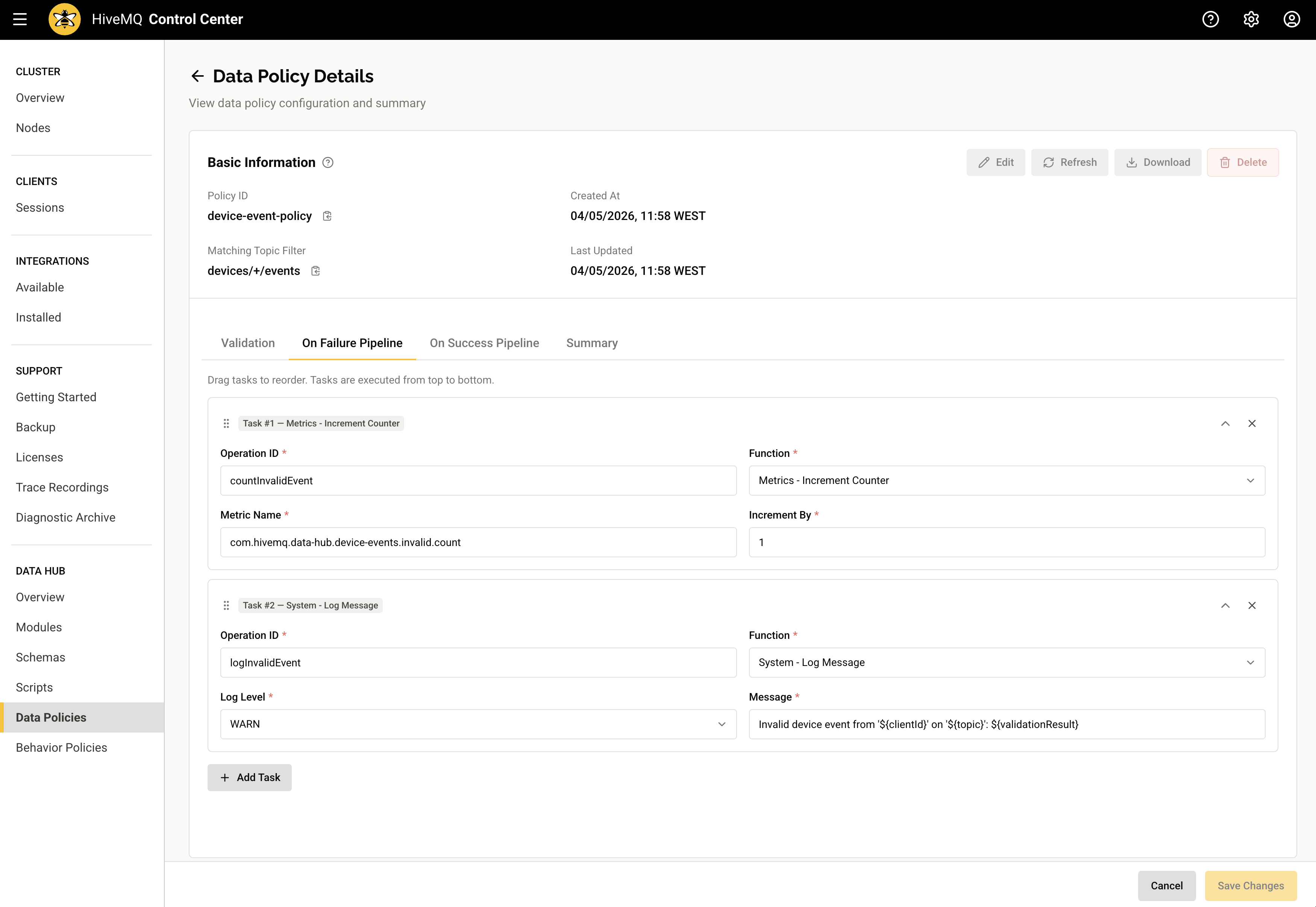
HiveMQ 4.52 expands Data Hub support in Control Center v2 with the ability to create, edit, and delete both data policies and behavior policies directly from the user interface.
How it works
Navigate to the Data Hub section in Control Center v2 and open either the Data Policies or Behavior Policies view.
- Use the create action on the list view to define a new data policy or behavior policy.
- Select any existing policy to open its detail view, then edit its configuration in place or delete the policy.
How it helps
You can now manage Data Hub data policies and behavior policies directly from Control Center v2. These capabilities reduce reliance on the API for routine tasks and improve day-to-day operational efficiency.
For more information, see the Data Hub in Control Center v2 documentation.
More Noteworthy Features and Improvements
HiveMQ Enterprise MQTT Broker
- Fixed an issue in which single-node brokers without a clustering configuration failed to start when Pulse was enabled.
- Fixed an issue where changes to the maximum message expiry interval configuration in the broker
config.xmlfile were not applied to existing messages. - Fixed a rare race condition where subscription replication ended prematurely during topology changes.
- Fixed a race condition that could silently drop stored topics during topology changes.
- Fixed an issue that could cause individual shared subscriptions to stop receiving messages.
- Fixed an issue where client disconnects were not processed promptly when the client disconnected before successfully establishing an MQTT connection.
- Streamlined extension
async(...)authentication handling so simple, enhanced, and re-auth flows cancel immediately on client disconnect instead of lingering until the configured async timeout.
HiveMQ Control Center v2
- Added Data Hub license details to the Licenses view.
- Added a new
HIVEMQ_VIEW_DATA_DATA_HUB_LICENSESpermission to control access to Data Hub license information. - Added the reason for a degraded integration health status in the Installed Integrations view.
- Added the option to export supplemental diagnostic information to the diagnostic archive.
- Added a Data Hub trial banner to relevant Data Hub pages so the trial state is visible on the interface.
HiveMQ Enterprise Security Extension
- Refined MQTT authentication to allow slow requests to complete and return their actual result instead of failing prematurely.
- Added a new
lanesconfiguration option for Argon2id password hashing.
HiveMQ Enterprise Bridge Extension
- Changed the application health status to report UP instead of DEGRADED when the extension is running with no enabled or configured bridges.
HiveMQ Enterprise Tracing Extension
- Removed the deprecated Jaeger trace propagator and Zipkin span exporters. Both exporters were deprecated in the OpenTelemetry specification. Use the W3C Trace Context propagator (
tracecontext) and the OTLP exporter (otlp-exporter) instead.
Get Started Today
To upgrade HiveMQ from a previous version, follow the steps in the HiveMQ Upgrade Guide and review the Known Issues section for any considerations that could affect your deployment.
To learn more about all the features the HiveMQ Platform offers, explore the HiveMQ User Guide.

HiveMQ Team
Team HiveMQ brings together deep expertise in MQTT, Industrial AI, IoT data streaming, UNS, and Industrial IoT protocols. Follow us for practical deployment guidance, best practices for building a secure, reliable data backbone, and insights into how we are shaping the future of connected industries.
Our mission is to transform industrial data into real-time intelligence, actionable insights, and measurable business outcomes.
Have questions or need support? Contact us. Our experts are ready to help.