What's New in HiveMQ 4.51?
The HiveMQ team is excited to announce the release of HiveMQ Enterprise MQTT Platform 4.51. This release expands Data Hub schema and script management in Control Center v2, adds audit log support for Control Center v2, introduces scope parsing in the Enterprise Security Extension, and delivers a range of fixes and improvements.
Highlights
- Data Hub Schema and Script Management in Control Center v2
- Audit Log for Control Center v2
Added Data Hub Schema and Script Management in Control Center v2
HiveMQ 4.51 expands Data Hub support in Control Center v2 with schema and script creation, versioning, and deletion.
How it works
Navigate to the Data Hub section in Control Center v2. Open the Schemas or Scripts view depending on the resource you want to manage.
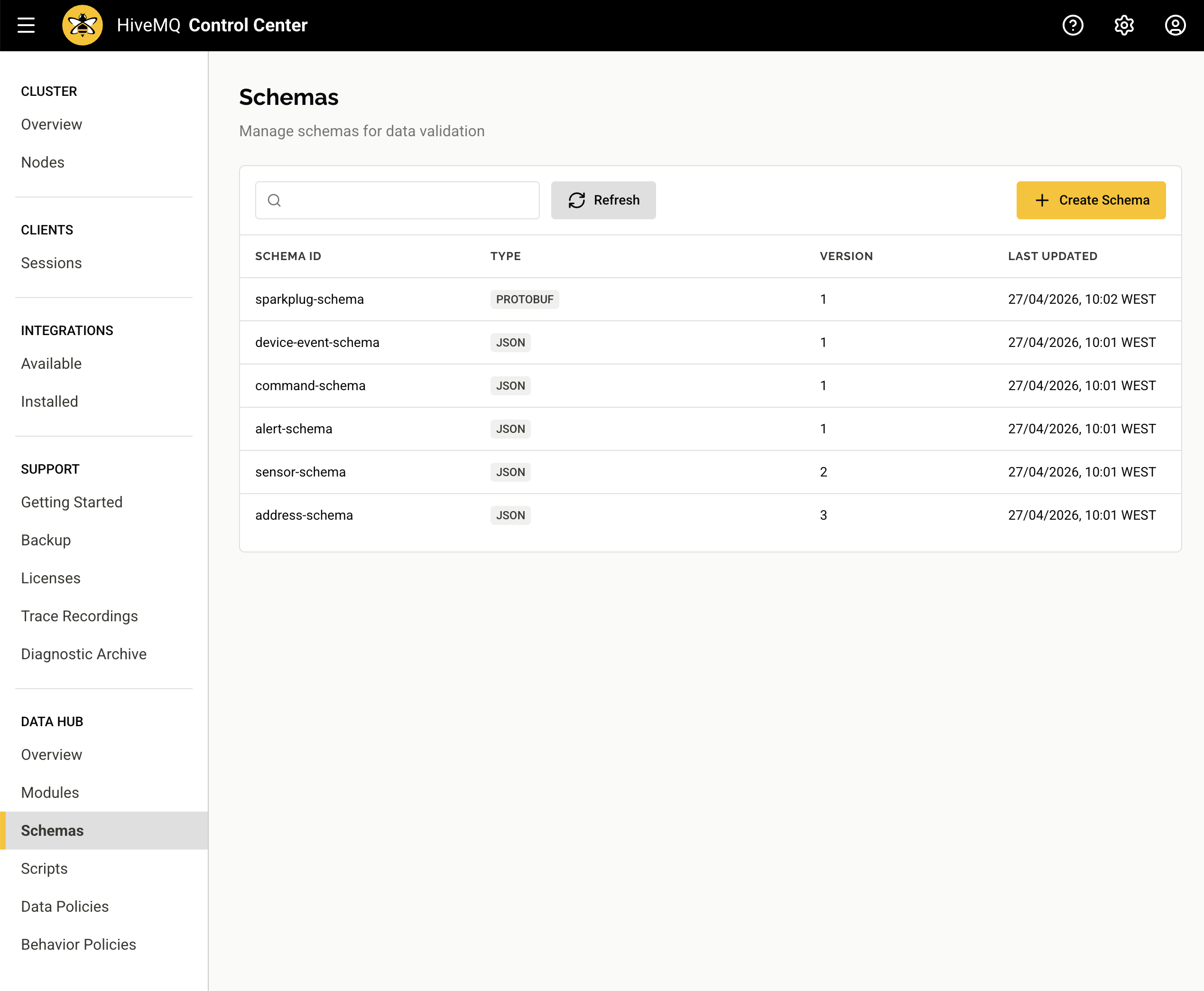
Create schemas and scripts
Use the create action on the Schemas or Scripts overview to define a new schema or transformation script.
Add new versions
Select any schema or script to open its detail view, then add a new version. All versions are preserved to ensure uninterrupted support of policies that reference specific versions.
Delete schemas and scripts
From the detail view, remove a schema or script and all its versions. Deletion is blocked when a resource is still referenced by a data policy, so existing pipelines stay intact.
How it helps
You can now manage schemas and scripts directly from Control Center v2. These capabilities reduce reliance on the API for routine tasks and increase ease of use.
For more information, see the Data Hub in Control Center v2 documentation.
Audit Log for Control Center v2
HiveMQ 4.51 extends audit logging to Control Center v2. Relevant actions performed in Control Center v2 now appear in the HiveMQ audit log alongside entries from the Control Center v1 and the REST API.
How it works
The audit log provides a unified record of auditing-relevant events from multiple sources. Control Center v2 log entries use the control-center-v2 source identifier.
How it helps
Recording Control Center v2 actions in the audit log makes it easier to review all actions performed on the HiveMQ cluster from a single source.
For more information on how to configure the HiveMQ audit log, see the HiveMQ Audit Log documentation.
More Noteworthy Features and Improvements
HiveMQ Enterprise MQTT Broker
- Fixed a rare race condition that could cause data loss when a node leaves the cluster while another node is joining.
HiveMQ Control Center v2
- Fixed an issue where overlapping metric polling windows produced duplicate data points in dashboard charts until the view was refreshed.
- Improved the display of maximum connection information on the Licenses view.
- Enhanced select-all and deselect-all checkbox behavior on the diagnostic archive and trace recording creation pages.
- Added a tooltip for truncated dates on the dropped messages details view.
HiveMQ Enterprise Security Extension
- Added a new
splitattribute on thescopeelement that splits space-separated JWT scope claim strings into individual scope values when set totrue. - Added the ability to use the
scopeelement with analtattribute without specifying expected values, allowing any JWT claim to source authorization roles without value validation. - Improved input validation in the ESE Helper CLI so that invalid short options produce a clear error instead of silently generating invalid data.
HiveMQ Data Hub
- Improved data validation for better overall performance.
Get Started Today
To upgrade HiveMQ from a previous version, follow the steps in the HiveMQ Upgrade Guide and review the Known Issues section for any considerations that could affect your deployment.
To learn more about all the features the HiveMQ Platform offers, explore the HiveMQ User Guide.

HiveMQ Team
Team HiveMQ brings together deep expertise in MQTT, Industrial AI, IoT data streaming, UNS, and Industrial IoT protocols. Follow us for practical deployment guidance, best practices for building a secure, reliable data backbone, and insights into how we are shaping the future of connected industries.
Our mission is to transform industrial data into real-time intelligence, actionable insights, and measurable business outcomes.
Have questions or need support? Contact us. Our experts are ready to help.

