How to Stream CAN Bus Data via MQTT for Real-Time Asset Monitoring
CAN Bus is the communication standard that keeps machines running. It connects the electronic control units inside vehicles, manufacturing equipment, agricultural machinery, and industrial robots - handling thousands of messages per second, reliably, without a host computer in the loop.
The problem is that CAN Bus was designed for closed-loop, local communication. It has no native mechanism for routing data to cloud platforms, enterprise systems, or monitoring dashboards. Operations teams working with CAN-equipped assets are sitting on a continuous stream of machine health data they can't easily access outside the device.
MQTT is the integration layer that changes that. It's a lightweight, pub/sub protocol built for high-frequency telemetry over constrained and unreliable networks - precisely the conditions that industrial edge environments present. Pair MQTT with an edge gateway that handles CAN frame capture and decoding, and you have a complete pipeline from machine sensor to real-time monitoring system.
This guide walks through that pipeline step by step: what CAN Bus is, how the data structure works, why MQTT is the right transport layer, and how to build the edge integration that makes real-time asset monitoring possible.
The Problem with CAN Bus Data at the Edge
CAN Bus was engineered for deterministic, closed-loop communication inside machines and vehicles - not for transmitting data to cloud platforms or enterprise systems. That design decision made it reliable and fast within its intended domain. It also made it effectively invisible to anything outside that domain.
Raw CAN data is binary, high-frequency and device-specific. Without a translation and transport layer, it never leaves the machine. The frames carry no labels, units or context - just bit patterns that mean different things depending on the manufacturer, the model year and the specific ECU generating them.
Traditional approaches don't scale well because polling introduces latency and proprietary gateways create data silos and lock-in. Batch logging means operations teams are always working from historical data, not the current state of the asset. When a machine is trending toward failure, a report generated at the end of a shift is far too late.
And so, the result is predictable: maintenance crews react to failures instead of predicting them, while engineering teams spend cycles on one-off integrations instead of scalable monitoring systems, and the data that could improve reliability sits inaccessible at the edge.
A lightweight, reliable protocol that bridges the edge to the enterprise without sacrificing fidelity or adding integration complexity is needed instead - and an edge layer that handles the protocol translation between CAN Bus and that transport layer. That's where MQTT comes in.
Before getting into how MQTT solves the problem, it helps to understand exactly what CAN Bus is and why its architecture creates this challenge in the first place.
What is CAN Bus Protocol?
CAN Bus (Controller Area Network) is a serial communication standard developed by Bosch in the 1980s. It allows microcontrollers and electronic devices to communicate directly with each other without requiring a host computer to manage the exchange. A single CAN Bus system can support dozens of nodes simultaneously, all sharing the same two-wire differential bus.
The protocol is used across a wide range of industries: automotive ECUs managing engine, transmission, and safety systems; industrial PLCs coordinating production line equipment; agricultural machinery monitoring engine load and implement position; robotics systems coordinating motion and feedback; and rail systems managing diagnostics and safety.
CAN Bus uses a multi-master architecture, meaning any node can initiate a message without a central controller. Differential signaling on the two-wire bus provides noise immunity critical in electrically harsh industrial environments. Message arbitration handles collisions without data loss, and the protocol has no IP addressing - nodes communicate by message ID, not by address.
What Is an ECU?
An ECU (Electronic Control Unit) is the embedded computing device that connects to a CAN Bus network and handles a specific set of functions - engine management, transmission control, braking or sensor monitoring, for example.
Each ECU contains three components relevant to CAN Bus:
Microcontroller which processes inputs and outputs,
CAN controller which handles message framing and bus arbitration,
CAN transceiver which handles physical signaling on the bus.
Understanding ECUs matters for integration engineering because each ECU is a data source. It continuously generates CAN messages carrying sensor readings, status flags and control signals - RPM, temperature, pressure, fault codes, position data. That's the data engineers want to capture, decode and stream for real-time monitoring. The CAN Bus connects all these ECUs together; the integration challenge is getting their data out.
CAN Bus Frame Types and Data Structure
CAN Bus uses four frame types: data frames (carrying payload), remote frames (requesting data from another node), error frames (signaling a detected error) and overload frames (requesting a delay between transmissions).
Data frames are what monitoring and telemetry pipelines care about.
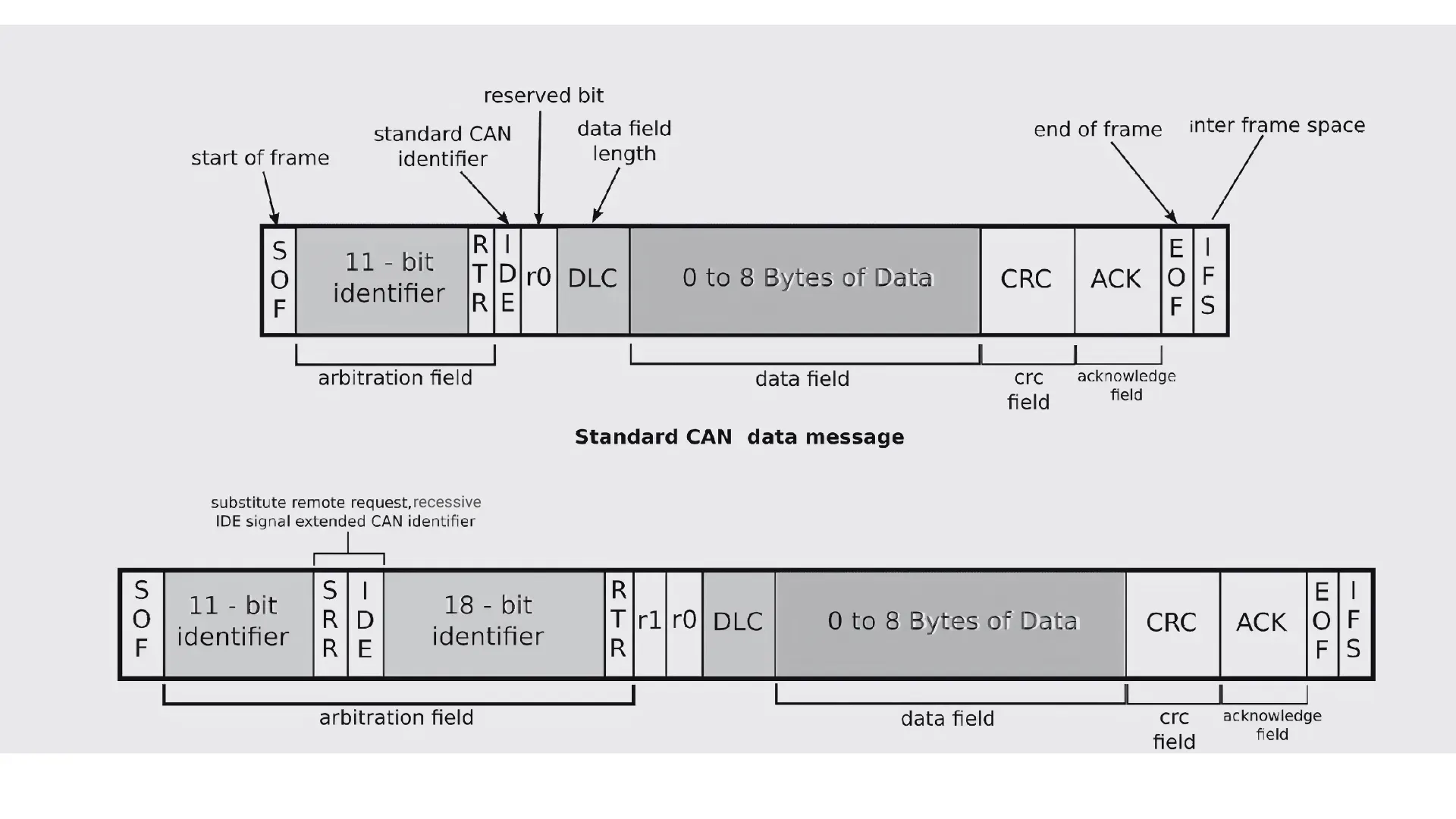 Image Source | Standard and Extended frame of the CAN data message architecture
How to Use CAN Bus to Send Data
When an ECU needs to send data, it constructs a data frame and places it on the bus. All nodes receive every message; each node checks the identifier and decides whether to process it. The identifier also determines priority - lower numerical value wins arbitration, so critical messages get through first.
The pub/sub analogy maps reasonably well: publishers put messages on the bus, subscribers filter by identifier. The key difference from MQTT is that CAN Bus is a closed, local bus - there's no concept of a broker routing messages to external systems.
The CAN Bus Data Structure
A standard CAN data frame consists of the following fields:
Frame Field | Size | Purpose |
|---|---|---|
SOF (Start of Frame) | 1 bit | Marks the beginning of a frame; synchronizes all nodes on the bus |
Arbitration Field | 11 bits (standard) / 29 bits (extended) | Message identifier and RTR bit; lower value = higher priority |
Control Field | 6 bits (incl. DLC) | Defines the data length code (DLC) and reserved bits |
Data Field | 0-8 bytes (CAN) / 0-64 bytes (CAN FD) | The actual payload: sensor values, status flags, control signals |
CRC Field | 15 bits (CAN) / 21 bits (CAN FD) | Cyclic redundancy check for error detection |
ACK Field | 2 bits | Receiving nodes confirm receipt by setting the ACK slot |
EOF (End of Frame) | 7 bits | Marks the end of the frame; recessive bits signal completion |
The DLC (Data Length Code) in the Control Field tells every receiving node how many bytes of payload to expect in the Data Field - from zero to eight bytes for standard CAN, up to 64 bytes for CAN FD. Without the DLC, nodes wouldn't know where the data ends and the CRC begins.
Why MQTT Is the Right Protocol to Stream CAN Bus Data
The core mismatch between CAN Bus and enterprise monitoring systems comes down to scope. CAN Bus is excellent at deterministic local communication across a closed bus. It has no native mechanism for routing data to external systems - no IP stack, cloud connectivity or concept of a subscriber outside the bus.
Bridging that gap requires a transport protocol built for the conditions industrial edge environments present: intermittent connectivity, constrained bandwidth, high message frequency and reliability requirements that can't be met by polling or REST. MQTT was designed for exactly this.
Pub/sub wins over polling and REST for edge telemetry for three reasons: lower bandwidth consumption because only changed data gets published, no persistent connection required between edge device and broker, and a protocol design explicitly optimized for unreliable networks. REST requires a persistent connection and a round-trip per data point; neither scales to high-frequency CAN telemetry.
The specific MQTT properties that matter for CAN Bus streaming:
Lightweight framing: Minimal protocol overhead per message, which matters when High-Speed CAN can generate up to 1 million messages per second.
QoS levels: Delivery guarantees tuned to signal criticality - QoS 0 for high-frequency telemetry where occasional loss is acceptable, QoS 1 for fault codes requiring at-least-once delivery.
Persistent sessions: Monitoring continuity when assets go temporarily offline. The broker retains subscriptions and queues messages until the client reconnects.
Retained messages: The last-known-good state for any topic is always available to new subscribers - useful for monitoring systems that connect after an asset has already been running.
The architecture that makes this work is an MQTT edge gateway or broker sitting between the CAN Bus devices and the enterprise platform. The gateway handles CAN frame capture, decoding, and publishing. The broker handles fan-out to subscribers, access control and persistence.
Structuring decoded CAN signals into logical MQTT topic hierarchies normalizes data across assets. A topic like factory/line1/machine3/engine/rpm gives monitoring systems a consistent way to filter by plant, production line, asset type or individual signal, without any custom backend logic for each new asset type added to the fleet.
How to Stream CAN Bus Data via MQTT: Step by Step
Step 1: Read CAN Bus Data at the Edge
Reading CAN frames requires a hardware interface between the CAN Bus and the edge computing device running your gateway software. Three common options:
USB-to-CAN adapters for development, prototyping, and lower-throughput deployments
Embedded CAN controllers integrated into industrial edge gateways and PLCs
Industrial edge computing platforms with onboard CAN interfaces designed for ruggedized environments
On the software side, SocketCAN is the standard Linux kernel interface for CAN hardware, providing a socket-based API that makes CAN devices look like network interfaces to application software.
Using custom Python on edge devices, with python-can library for reading CAN bus data through SocketCAN, and paho-mqtt library for sending the data out using MQTT.
Node-Red on industrial edge devices using node-red-contrib-socketcan to read CAN bus data and then send data out using MQTT nodes.
OEM SDKs are available for specific hardware platforms where SocketCAN isn't supported.
At this layer, what you're capturing are raw CAN frames (binary data with an identifier and a payload). The identifier tells you which ECU sent the message and roughly what it contains. The payload is a byte string that means nothing until decoded.
Step 2: Decode Raw CAN Frames to Engineering Values
Raw CAN data is unreadable without a translation layer. The bytes in the Data Field carry no labels, no units, and no human-readable context. Byte 3, bits 4 through 11 might be engine RPM in the range 0 to 8,000, but without the manufacturer's signal definitions, there's no way to know that from the frame alone.
A CAN DBC file (Database CAN) is the standard format for providing that translation. It's a text-based file that maps raw frame IDs and bit positions to named signals and physical values, including the signal name, byte position, bit length, scaling factor, offset, units and value range. A DBC entry for engine RPM might specify: frame ID 0x0CF004EE, starting bit 24, length 16 bits, factor 0.125, offset 0, unit: RPM, range: 0-8032.
Getting the right DBC file is often the most time-consuming part of the integration. Sources include:
The OEM directly: Most manufacturers provide DBC files for their equipment under NDA or as part of a diagnostic toolkit
Reverse engineering the bus traffic using logging tools and known signal behaviors
Open community databases such as the Open Vehicle Monitoring System (OVMS) library for common vehicle models
The decoding process applies the DBC to parse raw frames into named signals with physical values: RPM, temperature in Celsius, pressure in bar, fault codes as enumerated values. Open-source options include cantools and python-can for DBC parsing and signal extraction. Commercial decoders offer additional features like real-time monitoring dashboards, multi-DBC management, and enterprise support.
Step 3: Publish Decoded Data to an MQTT Broker
With decoded engineering values available, the next step is publishing them to an MQTT broker in a structured, consistent format.
Topic hierarchy design is the most consequential decision at this stage. A well-structured topic hierarchy lets monitoring systems filter by plant, line, asset or individual signal without custom backend logic. A consistent pattern like plant/line1/machine3/engine/rpm makes it straightforward to subscribe to all signals from a specific machine, all RPM signals across the fleet or all data from a specific production line - using standard MQTT wildcard subscriptions.
QoS level selection by signal type:
QoS 0 for high-frequency telemetry where occasional message loss is acceptable (temperature readings every 100ms, position data at high sample rates)
QoS 1 for critical fault codes, threshold alerts, and status changes where at-least-once delivery is required
Edge-side filtering before publishing protects broker throughput and keeps monitoring dashboards clean. Not every CAN message needs to reach the broker. Rate limiting, change-of-value triggers (only publish when a value changes beyond a defined threshold), and signal aggregation at the edge reduce noise without losing meaningful data.
Payload format decisions depend on the downstream use case. JSON provides readability and broad compatibility with monitoring platforms and analytics tools. Binary encoding or Protocol Buffers reduce message size for throughput-sensitive deployments where bandwidth is constrained.
Step 4: Route and Process Data in the MQTT Broker
The MQTT broker is where the edge pipeline meets the enterprise. Its job is to receive decoded CAN signals from edge gateways and fan them out reliably to every downstream subscriber - SCADA systems, historians, monitoring dashboards, analytics platforms and AI pipelines.
For industrial CAN Bus use cases, the broker needs to handle the throughput demands of high-frequency telemetry without data loss, support clustering for high-availability deployments, provide persistence for offline assets and enforce security through TLS/mTLS encryption and access control lists.
HiveMQ is purpose-built for this class of deployment. It handles high-frequency CAN Bus telemetry at enterprise scale - millions of messages per second across distributed broker clusters - with enterprise-grade features for security, persistence, and multi-cloud deployment. A single HiveMQ cluster can serve as the central routing layer for CAN Bus telemetry from thousands of assets across multiple sites.
Downstream connections from the broker include time-series databases (InfluxDB, TimescaleDB) for historical trend analysis, visualization platforms (Grafana, Ignition) for real-time dashboards, and analytics and AI/ML platforms for anomaly detection and predictive maintenance model training.
Real-Time Asset Monitoring with CAN Bus and MQTT
Real-time monitoring in a CAN Bus context means continuous visibility into machine health, not periodic polling or end-of-shift reports. Operators and systems see what's happening on the asset as it happens, enabling responses that are measured in seconds not hours.
CAN Bus telemetry over MQTT enables:
Anomaly detection: Identifying abnormal RPM, temperature drift, or pressure deviation before they become failures. Streaming telemetry provides the baseline and the real-time signal needed to detect deviation continuously.
Predictive maintenance: Building trend models on vibration, load cycles, and operating hours to predict component wear. CAN Bus signals carry exactly the data these models need, and MQTT delivers it in real time to the analytics platform.
Fault code monitoring: Detecting and routing DTC (Diagnostic Trouble Code) alerts in real time rather than discovering them at the next scheduled inspection. A fault code published to the broker at QoS 1 can trigger an alert workflow before the operator even reaches the machine.
Fleet-wide visibility: Aggregating telemetry across distributed assets - mobile equipment, remote machinery, multi-site operations - into a single monitoring view. MQTT's topic hierarchy makes fleet-level aggregation a subscription rather than an integration project.
MQTT's pub/sub architecture is what makes this scalable. Multiple monitoring consumers can subscribe to the same data stream without any additional edge integration work. Adding a new dashboard or connecting a new AI model is a subscription, not a new integration project. The edge pipeline stays unchanged; only the subscriber list grows.
What 'real-time' actually means in practice: sub-second delivery from edge to monitoring system is achievable with the right broker configuration and QoS settings. For most CAN Bus telemetry use cases, latency of under 100ms from edge to dashboard is realistic with HiveMQ and a well-designed topic hierarchy.
For mobile and remote assets, MQTT persistent sessions and retained messages ensure that monitoring systems maintain the last-known state even when an asset temporarily loses connectivity. When the asset comes back online, telemetry resumes and the broker delivers any queued messages the client missed.
Understanding Which CAN Bus Version Your Assets Use
Understanding which CAN Bus version your assets use determines throughput capacity, payload limits, and ultimately how you design the edge integration and monitoring pipeline. Choosing the wrong assumptions at design time creates bottlenecks or unnecessary overhead when the system is under real-world load.
Version | Max Speed | Max Payload | Common Use Case | MQTT Streaming Relevance |
|---|---|---|---|---|
High-Speed CAN (ISO 11898-2) | 1 Mbit/s | 8 bytes | Automotive, industrial monitoring | Primary target for most asset monitoring pipelines |
Low-Speed CAN (ISO 11898-3) | 125 Kbit/s | 8 bytes | Body electronics, fault-tolerant systems | Less common in telemetry pipelines |
CAN FD | 8 Mbit/s | 64 bytes | EV, autonomous vehicles, advanced manufacturing | Growing fast - plan for it in new deployments |
For MQTT-based asset monitoring, High-Speed CAN and CAN FD are the versions you'll encounter most. High-Speed CAN is the baseline for automotive and industrial deployments built over the past 30 years. CAN FD's larger payload and higher throughput make it increasingly relevant as edge data volumes grow - particularly in EV platforms and advanced manufacturing environments where sensor density is increasing.
Design your topic structure and broker capacity with CAN FD in mind for new deployments. The larger payload allows more signals per frame, which changes how you structure the decoding and publishing pipeline. A broker that handles the message frequency of High-Speed CAN comfortably may need capacity review when CAN FD payloads increase data volume per message.
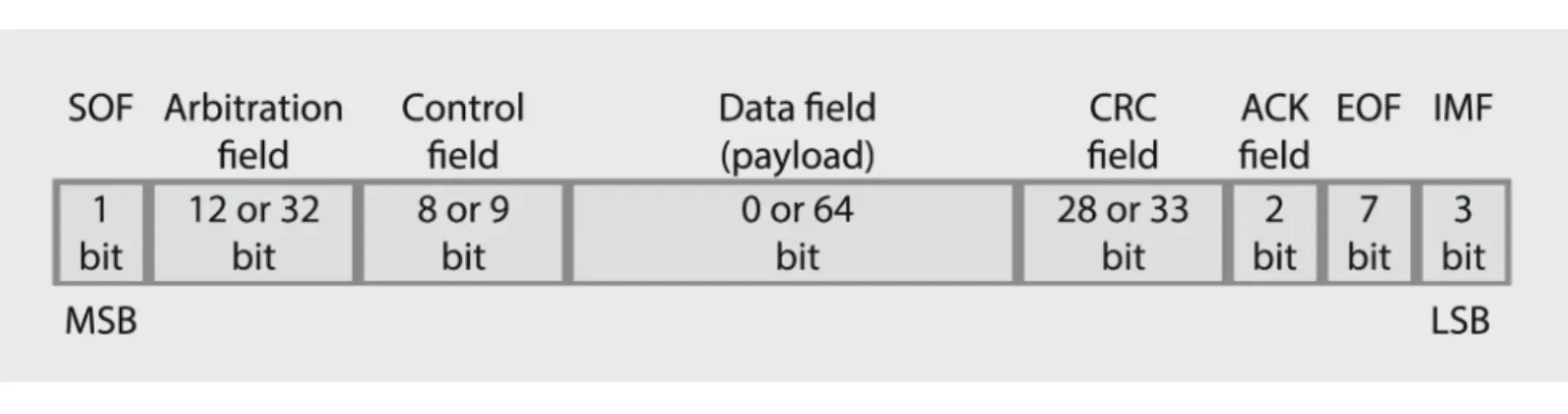 Image Source | Overview of a CAN FD message frame structure
How to Log CAN Bus Data
Logging and streaming serve different purposes in a CAN Bus monitoring architecture and most production deployments need both. Understanding when to use each and how they work together is part of designing a resilient integration.
On-device logging makes sense for post-event analysis, compliance records and environments with no connectivity. A hardware data logger records raw CAN frames to SD or flash storage for later offload and analysis. Software-based capture using SocketCAN-based logging on Linux edge devices can run in parallel with the MQTT publishing pipeline, giving engineers access to the raw frame record without interrupting live telemetry.
Real-time streaming is the right choice when monitoring outcomes require immediate visibility - anomaly detection, fault code alerting, predictive maintenance model inference. Logged data can tell you what happened after the fact; streamed data lets you act while it's happening.
For remote and mobile assets, store-and-forward is the architectural pattern that bridges the gap. The edge device buffers decoded CAN data locally when connectivity is unavailable and publishes it to the MQTT broker when the connection is restored. No gaps in the monitoring record, no data loss at connectivity boundaries.
MQTT retained messages act as a lightweight complement to logging. The broker always holds the last-known value of any retained topic, giving monitoring systems immediate state visibility when they connect or reconnect - without querying a log file or waiting for the next publish event.
Error Handling: CAN Bus vs. MQTT
CAN Bus and MQTT both have error handling mechanisms, but they operate at different layers and address different failure modes. Engineering teams building monitoring pipelines need to account for both.
CAN Bus error detection operates at the protocol level on the local bus. Every frame includes a CRC for error detection, and every receiving node monitors the bus for bit errors, form errors, and acknowledgment errors. When errors accumulate beyond defined thresholds, a node transitions to error-passive mode (it backs off and reduces its influence on the bus) and eventually to bus-off state (it disconnects from the bus entirely and stops transmitting). This protects the bus from a malfunctioning node disrupting all other communication.
MQTT handles delivery guarantees at a different layer, independent of physical or protocol-level error handling in CAN. QoS 0 provides best-effort delivery with no acknowledgment. QoS 1 provides at-least-once delivery with acknowledgment and retry on failure. QoS 2 provides exactly-once delivery through a four-step handshake. These guarantees apply across the network path between the edge gateway and the broker, not on the CAN Bus itself.
Why you need both operating correctly: CAN Bus manages errors on the local bus between ECUs and the edge gateway. MQTT manages reliable delivery across the network between the edge gateway and the broker. A CAN Bus error that puts a node in bus-off state stops data flowing to the gateway. A network outage between the gateway and the broker stops data reaching the monitoring platform. Monitoring pipelines need visibility into both failure modes, and different alerting strategies for each.
Practical implication for integration engineers: monitor CAN Bus error counters alongside MQTT delivery metrics. A spike in CAN Bus error frames often indicates a hardware issue (failing transceiver, cable fault, EMI) that will eventually show up as a gap in the MQTT stream, but catching it at the CAN layer gets you to root cause faster.
What's Ahead for CAN Bus in Industrial AI
CAN Bus isn't going away - but the environment around it is evolving fast. CAN FD is already expanding payload and throughput capacity in EV and advanced manufacturing platforms. Automotive Ethernet (100BASE-T1, 1000BASE-T1) is emerging as the high-bandwidth network for in-vehicle and machine networking where CAN Bus throughput is insufficient for camera, radar, and sensor fusion workloads. These technologies will coexist with CAN Bus rather than replace it; the powertrain and drivetrain monitoring use cases that CAN Bus handles well are unlikely to migrate any time soon.
The more significant shift is what happens to CAN Bus telemetry once it reaches the enterprise. Real-time CAN data is the input layer for the industrial AI use cases that are moving from experimentation to production: anomaly detection models that run inference on streaming sensor data, predictive maintenance pipelines that build on years of accumulated CAN Bus history, and digital twins that need continuous real-world telemetry to stay accurate.
MQTT is the integration layer that connects CAN Bus telemetry to these AI systems. The edge pipeline described in this guide - CAN capture, DBC decoding, MQTT publishing - produces the governed, structured, real-time data that AI models can act on with confidence. Adding a new AI consumer to that pipeline is a subscription to the broker, not a new integration project at the edge.
HiveMQ provides the broker layer that connects CAN Bus telemetry to the broader industrial data platform. From real-time streaming at the edge to the Data Intelligence and Agentic AI for Operations layers that turn telemetry into autonomous action, HiveMQ is designed to scale with the data volumes that modern industrial AI demands.
Frequently Asked Questions

Kudzai Manditereza
Kudzai is a tech influencer and electronic engineer based in Germany. As a Senior Industrial Solutions Advocate at HiveMQ, he helps developers and architects adopt MQTT, Unified Namespace (UNS), IIoT solutions, and HiveMQ for their IIoT projects. Kudzai runs a popular YouTube channel focused on IIoT and Smart Manufacturing technologies and he has been recognized as one of the Top 100 global influencers talking about Industry 4.0 online.



