The HiveMQ team is excited to announce the release of HiveMQ Enterprise MQTT Platform 4.49. This version introduces the first installment of Data Hub views in HiveMQ Control Center v2, new options for managing Data Hub Modules in Control Center v2, improved Argon2id password hashing performance and monitoring in the Enterprise Security Extension, and several important updates and fixes.
Highlights
- Initial Data Hub Support in HiveMQ Control Center v2
New Data Hub Management Options HiveMQ Control Center v2
HiveMQ 4.49 introduces the first set of dedicated Data Hub views in Control Center v2.
The new interface makes it significantly easier to view and explore schemas, data policies, behavior policies, scripts, and modules directly from Control Center v2.
NOTE: This is the first milestone in adding Data Hub support to Control Center v2. Additional views and capabilities will be introduced incrementally in upcoming releases.
How it works
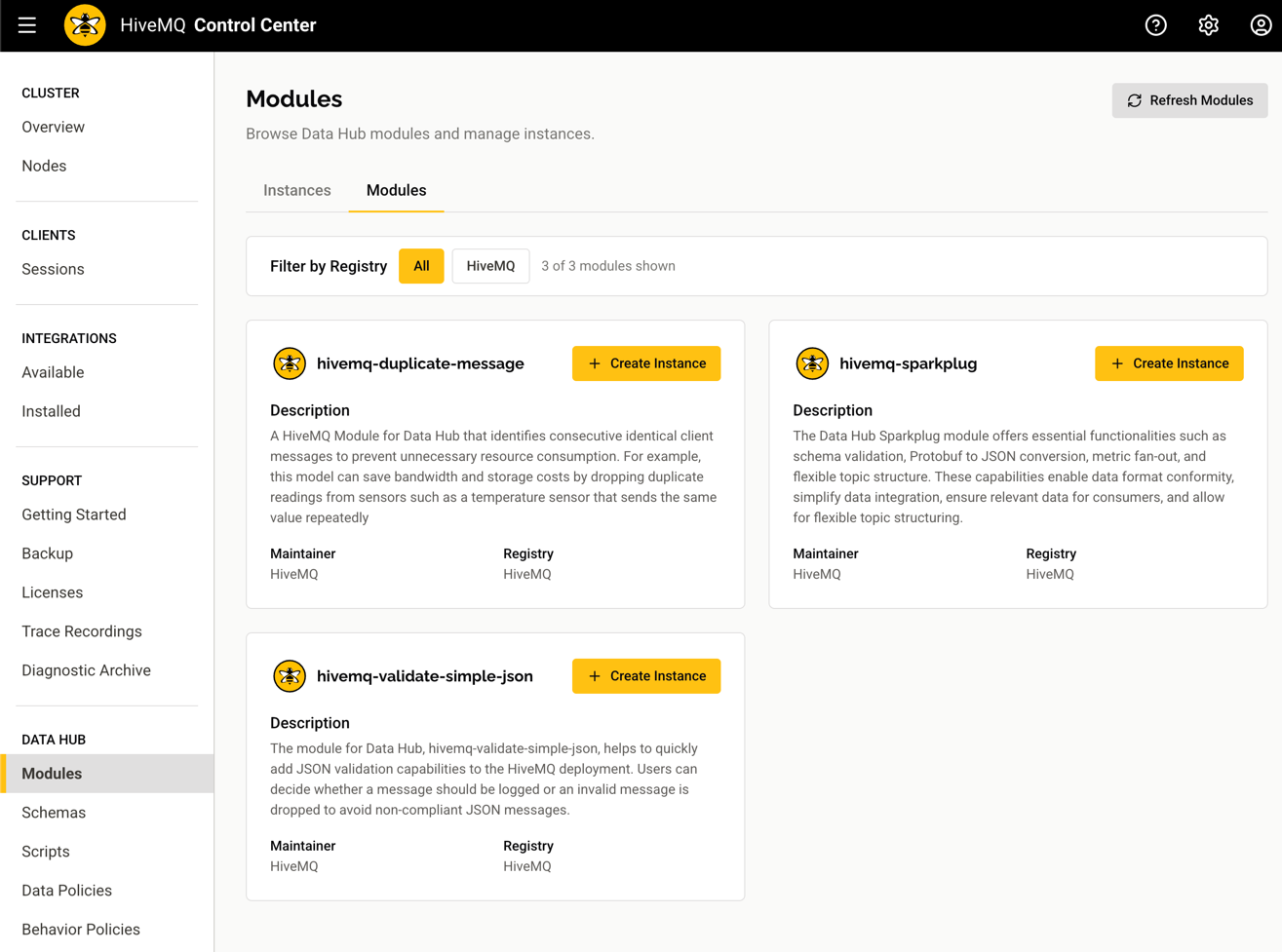
Open HiveMQ Control Center v2 and navigate to the Data Hub section to access the new set of views:
Browse Schemas, Policies, and Scripts
View all your Data Hub resources at a glance with dedicated list views for schemas, data policies, behavior policies, and scripts.
Explore Modules Across Registries
The Modules tab displays all available modules from your configured registries and allows you to create new module instances.
Monitor and Manage Module Instances
The Instances tab displays all module instances on your cluster, providing a quick overview of which modules are deployed. Selecting an instance provides a detailed view and instance management options.
How it helps
The new Data Hub views deliver deeper cluster visibility and improved usability to Control Center v2. This update enables you to:
- Instantly identify which schemas, policies, and scripts are deployed across your cluster.
- Browse all available modules from your configured registries in a single unified view.
- Create, monitor, and manage module instances directly from the Control Center UI.
For more information, see the Data Hub documentation.
Additional Features and Improvements
IMPORTANT: The HiveMQ Platform Docker images are now built on Ubuntu 24.04 LTS (Noble Numbat). The upgrade from Ubuntu 22.04 LTS to Ubuntu 24.04 LTS ensures your deployments benefit from the latest security patches, updated system libraries, and an extended Long-Term Support window.
If you build custom Docker images on top of the HiveMQ base image, test your images against the new base before deploying to production to verify full compatibility with the updated OS environment.
Additionally, the Java runtime will be updated to JDK-21.0.10 in the upcoming HiveMQ 4.50.0 and HiveMQ 4.48.24 versions of the official HiveMQ Docker images.
Scope: These changes only affect Docker-based deployments. Bare-metal and VM-based deployments are not affected.
HiveMQ Enterprise MQTT Broker
- Fixed a division by zero exception that could prevent a broker from joining or merging a cluster.
- Enhanced diagnostic archive creation to include all available data, even when errors occur while accessing system information.
- Added a new metric that reports the amount of system memory currently held in cache.
HiveMQ Control Center v2
- Added searchable Connected Node ID information to the Client Sessions overview, making it easier to identify which cluster node a client is connected to.
- Added "Data Hub Policy Prevented" to the list of reasons for dropped messages, providing visibility into how many messages are dropped due to Data Hub policies.
- Filters and pagination settings on the Client Sessions screen now persist during your browsing session.
- Unified the visual style of state badges across all table views for a more consistent user experience.
- Fixed number separators to consistently use locale-aware formatting across all views.
- Fixed an issue where the dropped messages chart did not scale correctly with the displayed time range, and corrected alignment issues in the dropped message reasons breakdown.
- Fixed an issue where the Diagnostic Archive menu link appeared visually disabled in maintenance mode even though it was fully functional.
HiveMQ Enterprise Security Extension
- Improved Argon2id password hashing performance by reducing memory allocations and garbage collection overhead during hash operations.
- Added a new
com.hivemq.extensions.ese.hashing.timemetric that tracks the duration of password hashing during authentication.
CAUTION: Recent Java Runtime Environment updates introduce security changes that can cause MQTT connection failures.
If you plan to upgrade to JDK 21.0.10 (released January 20, 2026) or JDK 25 (released September 16, 2025), read this Critical Java Security Update to understand the impact and prepare your HiveMQ deployment.
Get Started Today
To upgrade HiveMQ from a previous version, follow the steps in the HiveMQ Upgrade Guide and review the Known Issues section for any considerations that could affect your deployment.
To learn more about all the features the HiveMQ Platform offers, explore the HiveMQ User Guide.