Highlights
- Added Argon2id Support in the HiveMQ Enterprise Security Extension
- New Diagnostic Archive view in HiveMQ Control Center v2
Argon2id Password Hashing in the HiveMQ Enterprise Security Extension
HiveMQ 4.48 introduces native support for Argon2id password hashing in the HiveMQ Enterprise Security Extension (ESE).
Argon2id is the industry’s gold standard for password security. It specifically increases resistance to modern attack methods such as GPU-accelerated brute-force attacks and side-channel attacks. Argon2id is the recommended choice for new HiveMQ deployments that demand strong password security.
How it works
Argon2id uses a memory-hard design (defined in RFC 9106) that makes large-scale password cracking extremely expensive and inefficient for attackers.
In HiveMQ ESE, the algorithm identifier configures the memory using the following format: ARGON2ID_<memory>KB.
- Memory defines how much RAM is used per hash in kibibytes (1-10,000,000).
- The number of iterations controls the CPU cost.
Recommended Configurations (OWASP)
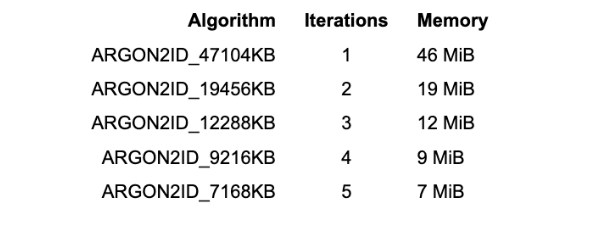
We recommend using the OWASP Password Storage Cheat Sheet for secure, production-ready Argon2id settings with different performance profiles. All options offer the same level of security with different emphasis on CPU and RAM usage:
Selecting the Right Configuration
Choose the configuration that best fits your infrastructure and performance goals:
- For environments with more RAM available, use higher memory with fewer iterations to minimize CPU cost. Example: ARGON2ID_47104KB with 1 iteration.
- For memory-constrained environments, use lower memory with more iterations to maintain security with less RAM usage. Example: ARGON2ID_7168KB with 5 iterations.
NOTE: Regardless of the configuration, always monitor authentication latency and adjust parameters as needed to maintain a good balance between security and performance.
Straightforward Argon2id setup with ESE
Example to configure an MQTT user with Argon2id in your ESE File realm file:
<mqtt>
<users>
<user>
<name>sensor-device-01</name>
<password>h3iG2fyvb5bltfiObd6lstGLQFJiL0V7Z8dJVTmLMvk=</password>
<salt encoding="Base64">dGVzdC1zYWx0</salt>
<iterations>2</iterations>
<algorithm>ARGON2ID_19456KB</algorithm>
<roles>
<role>device-role</role>
</roles>
</user>
</users>
</mqtt>
Simple hash generation with the ESE Helper tool
TIP: The helper tool is located in the
extensions/hivemq-enterprise-security-extension/helperfolder of your deployment.
Example using the ESE Helper tool to generate Argon2id password hashes:
./hivemq-ese-helper hash create -a ARGON2ID_19456KB -i 2 -s dGVzdC1zYWx0 -p

Enter a value for --password: my_secret_password

7a8E4AP1BMLYroFr8dUvuPPn5XEr3kIo8nQJ6mzqO1w=
For database authentication, you can also generate ready-to-use SQL statements:
./hivemq-ese-helper db create mqtt-client-user -a ARGON2ID_19456KB -i 2 -s dGVzdC1zYWx0 -p my_secret_password sensor-device-01

INSERT INTO users (username, password, password_iterations, password_salt, algorithm) VALUES ('sensor-device-01', '7a8E4AP1BMLYroFr8dUvuPPn5XEr3kIo8nQJ6mzqO1w=', 2, 'dGVzdC1zYWx0', 'ARGON2ID_19456KB');
How it helps
Modern attackers use GPU and ASIC hardware capable of testing billions of hashes per second. Even salted, fast hashing algorithms can be vulnerable at scale due to massive parallelism.
Argon2id changes the economics of attacks by forcing high memory usage per attempt. This makes large-scale cracking slow, expensive, and impractical, without significantly impacting legitimate authentication.
For detailed configuration options and additional examples, see the Enterprise Security Extension documentation.
New Diagnostic Archive View in HiveMQ Control Center v2
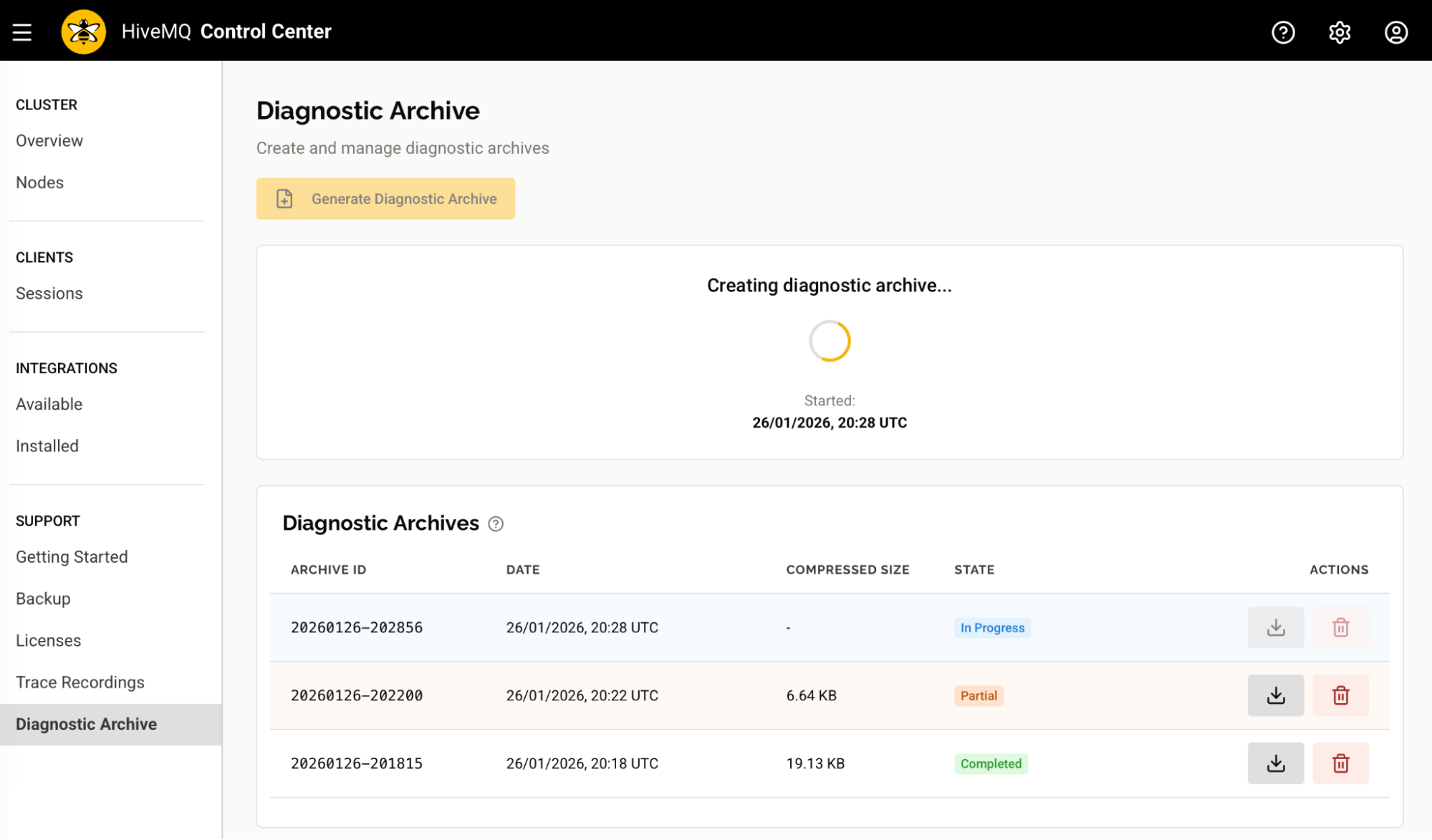
Starting in HiveMQ 4.48, Control Center v2 includes a Diagnostic Archive view. The new interface makes it easy to create, manage, and download in-depth diagnostic information for your HiveMQ deployment.
How it works
Open HiveMQ Control Center v2 and navigate to the Support section to access the new Diagnostic Archive view:
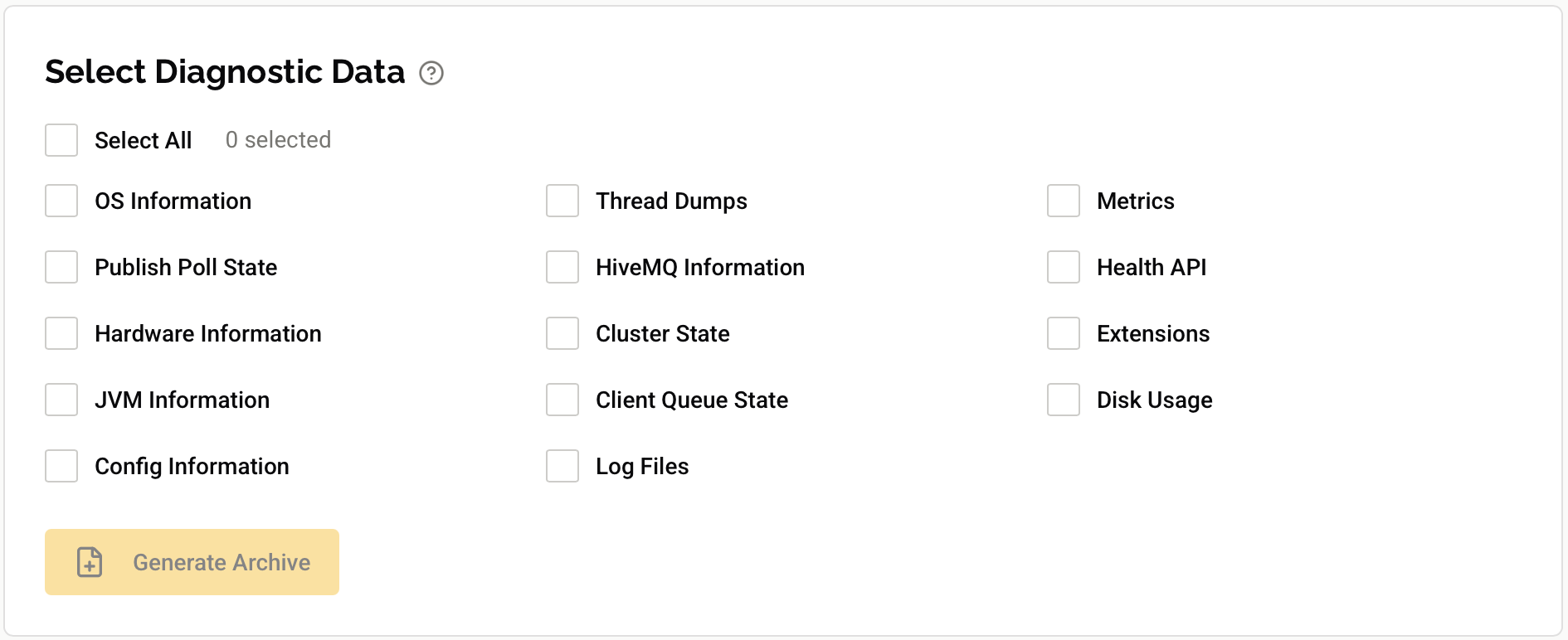
Create archives with customizable exporters
Select exactly the diagnostic data you need. Include data from all exporters with a single click, or choose from 14 exporters, including thread dumps, metrics, log files, JVM information, and more.
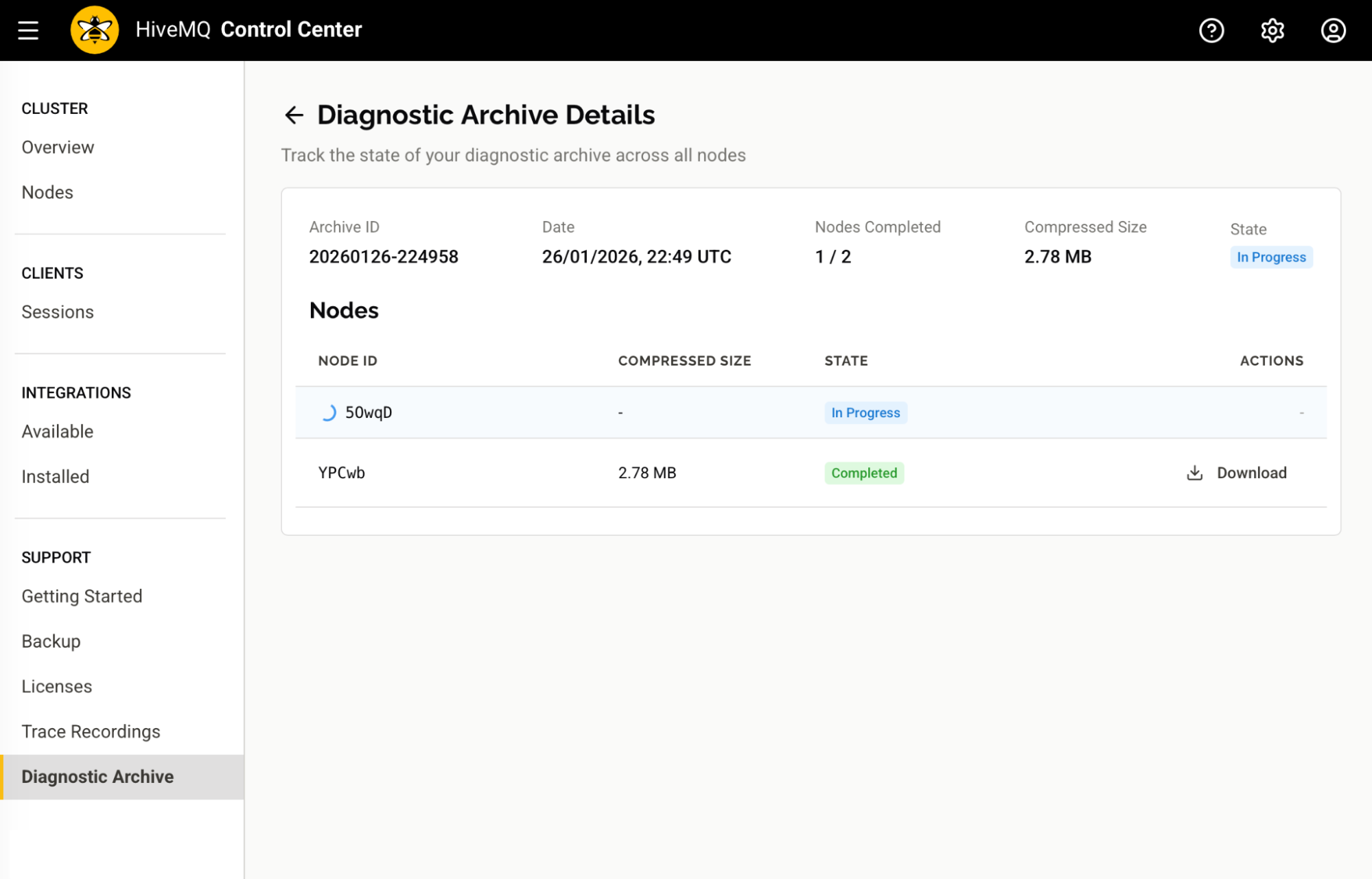
Monitor archive creation progress across your cluster
Track archive creation in real-time with per-node status indicators. See which nodes have completed, which are still in progress, and the size of each node's archive as it becomes available.
Download and manage archives
Download a combined archive that merges data from all cluster nodes, or download individual node archives for faster, targeted analysis.
When troubleshooting issues on a specific node, you can grab just that node's archive without waiting for data from the entire cluster. The ability to download individual node archives saves time when every minute counts during an incident.
How it helps
The Diagnostic Archive view in Control Centre v2 is designed to streamline troubleshooting. The view puts information into a centralized location so you can quickly gather pertinent data for your HiveMQ clusters:
- Instantly see all available Diagnostic Archives with their status and size.
- Create archives on demand with exactly the data you need.
- Monitor cluster-wide archive creation without leaving the UI.
- Download combined or node-specific archives directly from your browser.
- Get the right diagnostic data to share with HiveMQ Support for quick issue resolution.
For more details, see the Diagnostic Archive documentation.
More Noteworthy Features and Improvements
HiveMQ Enterprise MQTT Broker
- Fixed an issue that could impact message ordering for extension system message consumers in rare circumstances.
HiveMQ REST API
- Aligned OpenAPI specification examples with actual REST API behavior to eliminate inconsistencies.
HiveMQ Control Center v2
- Improved the backup page UI to provide consistent and reliable backup progress information.
- Fixed an issue that could prevent the extraction of backup files.
Get Started Today
To upgrade HiveMQ from a previous version, follow the steps in the HiveMQ Upgrade Guide and review the Known Issues section for any considerations that could affect your deployment.
To learn more about all the features the HiveMQ Platform offers, explore the HiveMQ User Guide.