What’s new in HiveMQ Edge 2025.21
HiveMQ Edge 2025.21 is our last release of the year, featuring two significant updates: DataHub UX changes and an improved OPC UA auto-reconnect strategy. The new DataHub functionality allows users to create and edit Schemas (JSON/Protobuf) and Scripts (JavaScript) independently from the policy designer, offering a clearer mental model and simpler policy configuration with dedicated editors and versioning. The enhanced OPC UA auto-reconnect mechanism introduces a sophisticated retry backoff strategy, significantly improving the resilience and reliability of the protocol adapter against transient network issues.
DataHub Resource Management: Create and Edit Schemas and Scripts Independently
What It Is
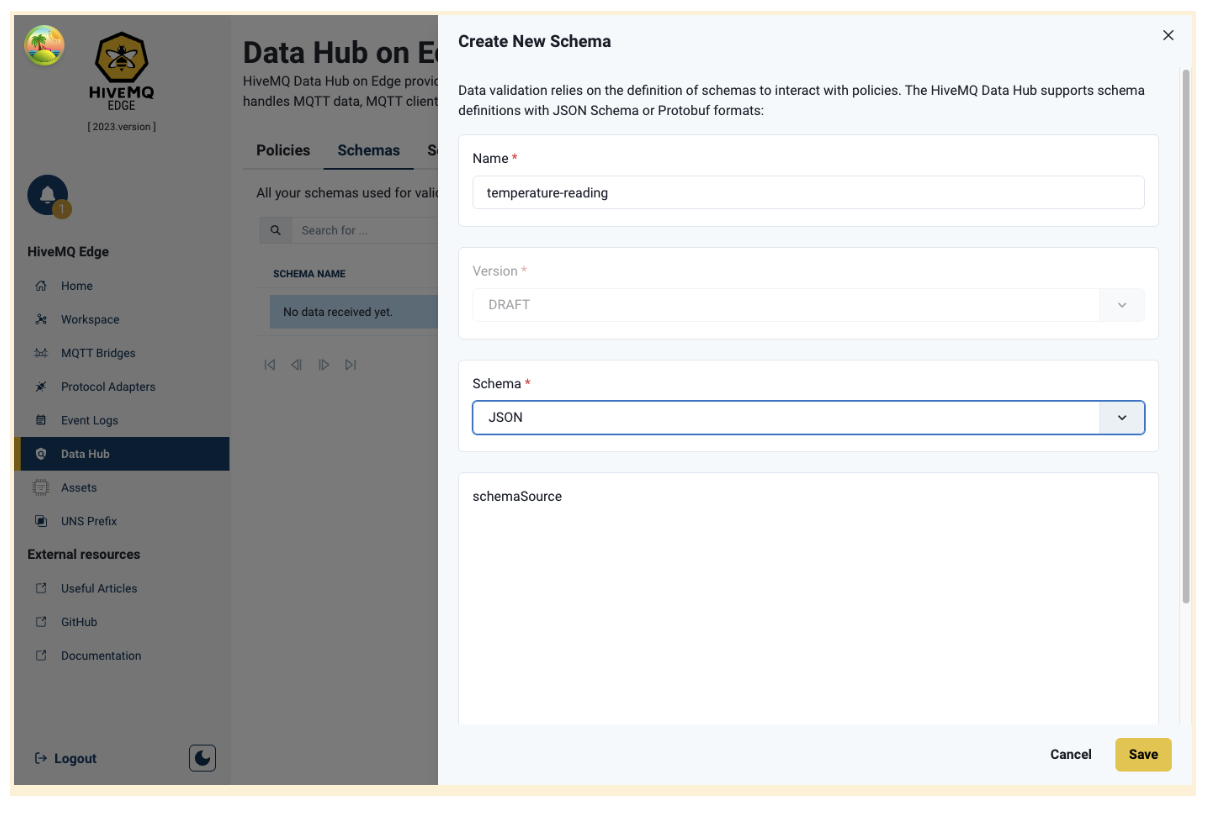
HiveMQ Edge DataHub now lets you create and edit schemas and transformation scripts directly from the main DataHub view, independent of policy design. Instead of managing resources within the policy designer's node panels, you now work with dedicated resource tables and editors.
The feature provides two main resource types, each with dedicated management:
- Schemas: JSON and Protobuf schema definitions for data validation, created and edited from the Schemas tab with Monaco code editor support
- Scripts: JavaScript transformation functions for data processing, managed from the Scripts tab with full syntax highlighting
- Simplified Node Panels: When designing policies, simply select existing resources by name and version from dropdown menus
- Version Management: New resource versions are created automatically when editing, preserving resource history
- Resource Tables: View all your schemas and scripts at a glance with Name, Type, Version columns and one-click editing
How it works
- Navigate to the Schemas or Scripts tab on the DataHub main page
- Click "Create New" to open a dedicated resource editor in a side drawer
- Fill in resource details - Enter name, select type (JSON/Protobuf for schemas), and write your definition or code in the Monaco editor
- Save your resource - It's immediately available for use in any policy
- Use in policies - When designing a policy, double-click a schema or function node and select your resource from a simple dropdown
All resource operations complete instantly. The Monaco editor provides professional code editing with syntax highlighting and validation. When you edit an existing resource, a new version is created automatically—your previous versions remain intact.
How It Helps
Clearer Mental Model
Resources are now first-class entities managed independently before use. You create your schemas and scripts as standalone assets, then reference them in policies. Create and organize all your schemas and scripts before building policies. No need to context-switch between "I'm designing a policy" and "I need to write this schema definition." Each task now has its dedicated workspace.
Simpler Policy Configuration
Policy node panels are now more straightforward just select which resource to use from a dropdown. Schemas and scripts now also follow identical patterns. Same table layout, same editor interface, same versioning behavior. Learn it once for schemas, and you already know how to manage scripts.
Improved OPC UA Auto-Reconnect with Retry Backoff Strategy
This release significantly enhances the resilience and reliability of the OPC UA Protocol Adapter integration by introducing a sophisticated, robust auto-reconnect retry backoff strategy. This new mechanism is specifically designed to manage transient network interruptions, server restarts, or momentary service unavailability with greater efficiency and less overhead.
How It Works
The core of this enhancement lies in its intelligent handling of connection failures. Instead of repeatedly attempting immediate reconnection, which can often overwhelm the OPC UA server or the underlying network, the new backoff strategy implements an escalating delay between retry attempts. This exponential increase in the waiting time provides necessary breathing room for the system to recover, ensuring that HiveMQ Edge does not contribute to a cascading failure scenario.
How It Helps
Previously, connection drops could cause repeated, rapid reconnection attempts, potentially leading to resource exhaustion and excessive network traffic. This enhancement results in smoother handling of unstable network conditions and reduces the load on both the client and server during reconnection spikes.
Improvements
🛠️ Bug Fixes
- Removed unintended dollar sign from the combined payload for Data Combinations
- Fixed issue where MQTT bridges could become stuck and stop forwarding messages during network outages. Solved by adding stalled connections detection mechanism, clearing pending message queues on reconnection and resuming forwarding when the network is restored.
🚀 Improvements
- The REST API now includes the adapter ID when querying domain tags, northbound mappings and southbound mappings. This makes it easier to identify which protocol adapter owns each configuration element, improving troubleshooting capabilities.
Deprecation Notice
HiveMQ Edge was migrated to JDK v21 in version 2025.16, HiveMQ Edge will need to be run in the Java run time environment for v21 or higher.
JDK v21 provides many enhancements and improvements to the efficiency and performance of HiveMQ Edge, and enables future data operations capabilities to be brought to the product.
Should you need to run HiveMQ Edge on a 32bit Architecture, or are already running Edge on a 32bit architecture then you should not use any version after 2025.15. For more information see our migration guide.
Get Started Today
Use the download link Get HiveMQ Edge 2025.21, or find us on GitHub and Docker:
Get started by running
docker run --name hivemq-edge --pull=always -d -p 1883:1883 -p 8080:8080 hivemq/hivemq-edgeOr clone our repository
git clone git@github.com:hivemq/hivemq-edge.gitYou may also try out our Helm Chart
helm repo add hivemq https://hivemq.github.io/helm-charts && helm repo update