What’s new in HiveMQ Edge 2024.6
This update brings a new file-input protocol adapter, a couple of bug fixes and UX improvements.
File-Input Adapter
How it works
The brand new file-input protocol adapter is able to read local files from file systems and translate the content into an MQTT payload. Numerous file content-types are support and modeled as MQTT payloads accordingly. To set up a file-input protocol adapter the file path, MQTT destination topic, and content-type is required. The adapter works similar as the other protocol adapters in a polling mode which can be easily configured as well. Features like Offline Buffering or Data Hub are integrated and are fully supported for new file-input adapter.
The file-input adapter supports the content-typeS: text/plain, text/csv, application/json, application/xml, and,
application/octet-stream.
An example config is shown in the screenshot below:
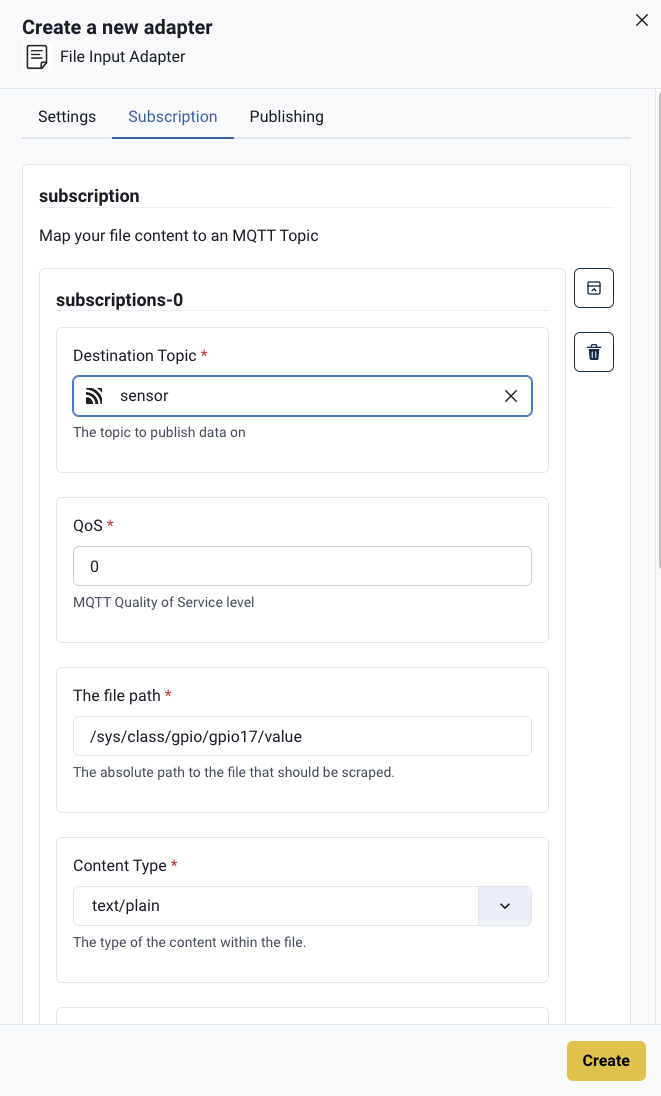
Polling the configured file in a one-second interval the following MQTT payloads are generated.
{
 "timestamp":1722271473101,
 "value":"20385",
 "tagName":"value",
 "contentType":"text/plain"
}{
 "timestamp":1722271474102,
 "value":"24871",
 "tagName":"value",
 "contentType":"text/plain"
}{
 "timestamp":1722271475100,
 "value":"6127",
 "tagName":"value",
 "contentType":"text/plain"
}
How it helps
There are numerous PLCs or software components in the OT world that use files as interfaces with other systems, for example capturing asset information stored in a file to add context to operational data being stored in a database. Moreover, there also exists certain interfaces available for direct access e.g. via file-system access, such as /sys.
Additional Features and Improvements
- Fix adapter discovery API
- Fixed an issue that could allow a QoS 2 message to complete a QoS 1 message flow.
- Clean up logs for stopped protocol adapters
Get Started Today
Get started by running
docker run --name hivemq-edge --pull=always -d -p 1883:1883 -p 8080:8080 hivemq/hivemq-edgeor clone our repository
git clone git@github.com:hivemq/hivemq-edge.git