What's New in HiveMQ 4.54?
The HiveMQ team is excited to announce the release of HiveMQ Enterprise MQTT Broker 4.54. This release introduces license key management and Data Hub validation metrics in Control Center v2, along with a wide range of performance and usability enhancements. Improvements include new operating-system metrics, richer diagnostic archives, and expanded configuration options in the HiveMQ Enterprise Security Extension and Data Lake Extension.
Highlights
- New License Key Management in the HiveMQ Control Center v2
- Data Hub Validation Metrics in Control Center v2
Manage Your Broker License Key from the Control Center
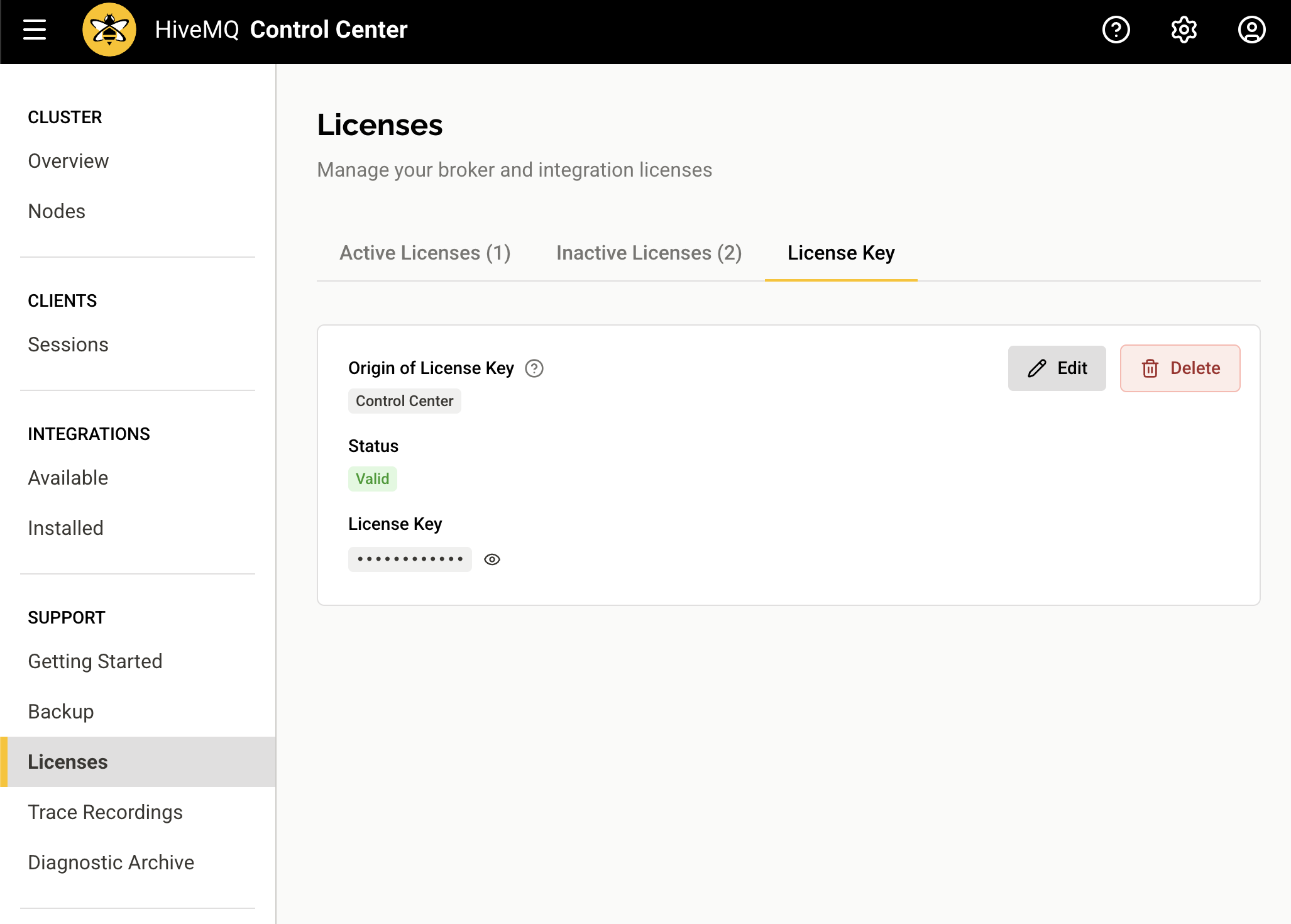
Until now, a license key change meant a file edit on every node. HiveMQ 4.54 introduces a new License Key tab in the HiveMQ Control Center v2. The tab lets you view, set, reveal, and remove the broker platform license key from one screen. Changes are propagated to all nodes without a restart.
Naturally, it is still possible to configure the license key through environment variables or a configuration file. In that case, the origin of the key identifies the configuration source. Keys that you set with an environment variable or configuration file are not editable in the Control Center.
How it works
The License Key tab in the Licenses view shows if a license key is configured, whether the key is valid, and the origin of the key. The origin of the key determines whether you can edit and delete the key in the Control Center.
HiveMQ applies license keys in the following order of precedence:
- Environment variable
- Configuration file
- Control Center
If the origin of the license key is an environment variable or the configuration file, the Control Center shows the key as read-only. To manage the key from the Control Center, remove the environment variable or the configuration file entry.
The Control Center masks the key value by default. With the appropriate permission, you can reveal, set, or remove the key value.
HiveMQ writes every set, remove, and reveal action to the audit log. Each entry records the action and the account that performed the action. No log entries contain the key value.
How it helps
Starting with HiveMQ 4.54, you can apply a license key directly in HiveMQ Control Center v2. Your HiveMQ audit log gives you a complete record of every license change for security and compliance reviews and never contains the key value.
For detailed configuration options and additional examples, see the Control Center v2 Licenses View documentation.
Data Hub Validation Metrics in Control Center v2
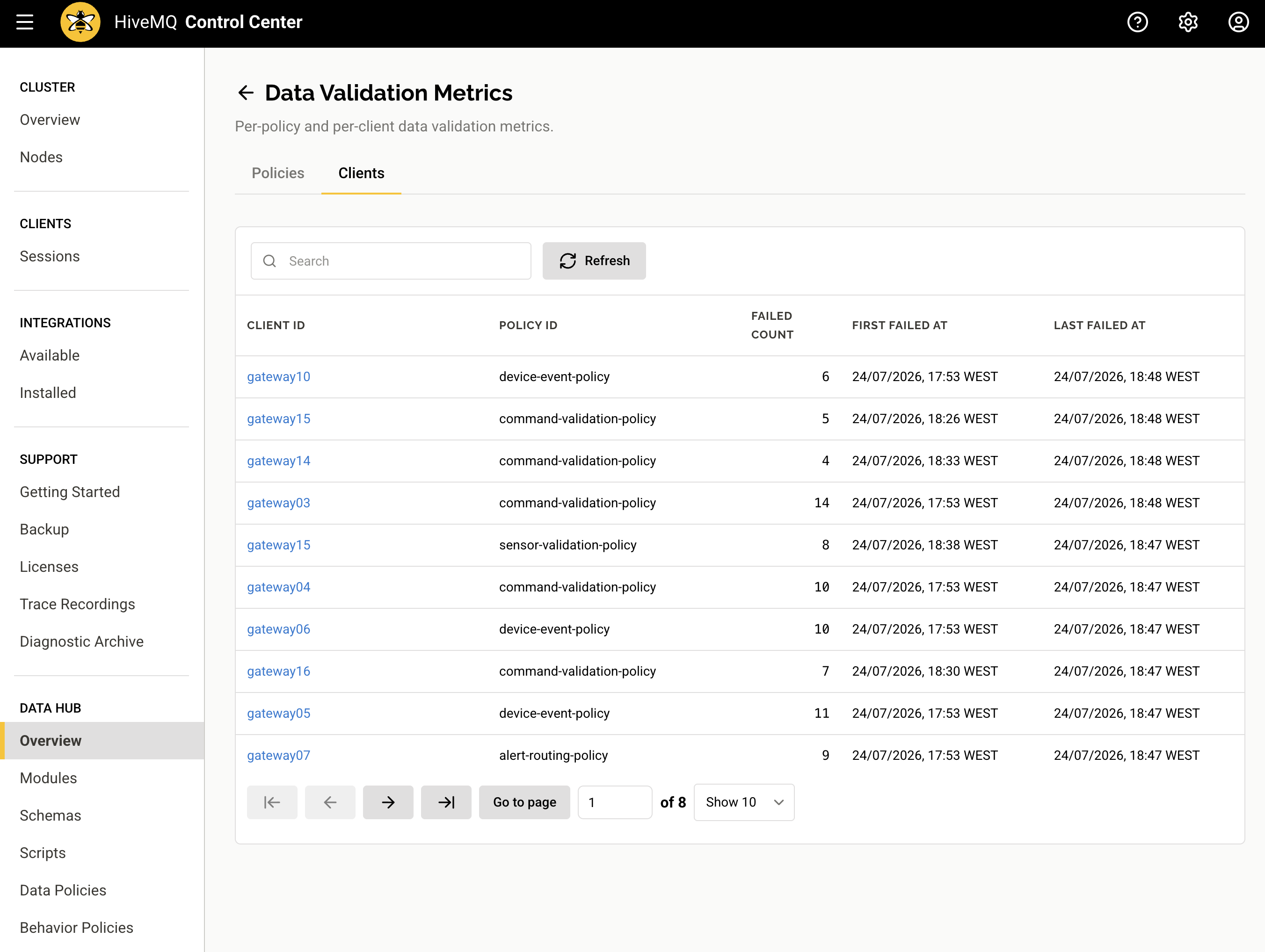
HiveMQ 4.54 expands the Data Hub overview in Control Center v2 with a breakdown of data validation policy activity by policy and by client.
How it works
Navigate to the Data Hub section in Control Center v2 and open the Overview view.
- Select the Successful or Failed chart. Your selection sets the metric for the policy breakdown, which ranks the top 10 policies by that metric.
- Select View details to open the Policies tab. The tab shows success and failure counts for each policy.
- Open the Clients tab to see which clients failed which policies, with failure counts and timestamps.
How it helps
When a validation policy starts rejecting messages, you need two answers: which policy, and which clients. The per-policy and per-client breakdowns answer both questions directly in the interface, so you can quickly pinpoint the source of validation failures.
For more information, see the Data Hub in Control Center v2 documentation.
More Noteworthy Features and Improvements
HiveMQ Enterprise MQTT Broker
- Added automatic connection string discovery so that HiveMQ Data Intelligence agents can now read the connection string via the HiveMQ Platform license.
- Added a default Data Intelligence
config.xmlfile to the HiveMQ Enterprise MQTT Broker distribution. - Added system-wide operating system metrics for context switches, interrupts, CPU frequency, load averages, process counts, and thread counts.
- Added Linux kernel
sysctlvalues (network, memory, and file-descriptor settings) to the operating system information in the diagnostic archive when/proc/sysis readable. - Added the configurations of active HiveMQ extensions to the diagnostic archive, with secrets redacted.
- Added a
single-writer-watchdog.logfile that reports potentially stalled single-writer tasks. - Fixed excessive warning logs that could clutter the log file when a gauge kept collecting metrics from a disk unmounted at runtime.
- Fixed a race condition in which the cleanup job disrupted the outgoing message flow of a shared subscription queue that briefly had no subscribers.
- Fixed a regression that could reduce the TCP buffer size for bridge clients in some cases.
- Fixed an issue where replica nodes kept queued messages for a shared subscription after the last client session for the subscription ended.
- Fixed an issue where a broker cluster behaved as if a node with an older version remained after a rolling upgrade.
HiveMQ Control Center v2
- Added the ability to create a Data Hub module from existing Data Hub policies.
- Added the ability to import and edit custom Data Hub modules.
- Added audit logs that record each access to sensitive client data on the client detail view.
- Unified the audit log source for Data Hub module actions so that all entries now use
control-center-v2 [Data Hub Modules]. - Enabled column sorting in the nodes table, with hostname as the default sort order.
- Added a total client count and pagination to the Clients list in the Shared Subscription view.
- Added a static background to the login screen to reduce CPU usage in remote desktop (RDP) sessions.
- Improved the display of long entries such as client IDs, which now truncate to fit the available screen width and show the full value in a tooltip.
- Added SUBACK to the list of available MQTT message type filters in the Trace Recording Details view.
- Fixed an issue where the Client Details view showed the global maximum message queue size instead of the configured per-client limit.
- Changed the internal API paths of Data Hub to avoid potential conflicts with the HiveMQ REST API.
- Fixed an issue where an expired session showed a generic error instead of logging out.
- Fixed an issue where the deletion of a Data Hub policy, schema, or script failed with a generic error.
HiveMQ Enterprise Security Extension
- Expanded PKCS5S2 password verification with support for 512-bit hash sizes, enabling migration of PKCS5S2-hashed passwords from the file RBAC extension into the ESE file realm.
HiveMQ Enterprise Data Lake Extension
- Added the option to configure multipart (chunked) upload per Amazon S3 route to reduce upload latency for large Parquet objects.
- Added a
UUIDfile-name template placeholder that gives each uploaded file a unique object name.
Get Started Today
To upgrade HiveMQ from a previous version, follow the steps in the HiveMQ Upgrade Guide and review the Known Issues section for any considerations that could affect your deployment.
To learn more about all the features the HiveMQ Platform offers, explore the HiveMQ User Guide.

HiveMQ Team
Team HiveMQ brings together deep expertise in MQTT, Industrial AI, IoT data streaming, UNS, and Industrial IoT protocols. Follow us for practical deployment guidance, best practices for building a secure, reliable data backbone, and insights into how we are shaping the future of connected industries.
Our mission is to transform industrial data into real-time intelligence, actionable insights, and measurable business outcomes.
Have questions or need support? Contact us. Our experts are ready to help.