 TL;DR
The HiveMQ industrial data platform gives manufacturers one place to go from raw plant-floor data to decisions they can trust, and to act on them while there is still time to change the outcome. This walkthrough covers the platform’s four capabilities (Connect, Contextualize, Analyze and Act) and shows how each one builds on the one before it.
- Connect brings data from your existing OT and IT systems into one secure, real-time backbone. A new data request becomes a subscription instead of another custom integration to maintain.
- Contextualize organizes that data into a governed unified namespace, with reusable data models and calculated KPIs such as OEE, so the same asset means the same thing at every plant.
- Analyze then checks that live data still matches those definitions. It catches problems like a temperature reading that suddenly arrives as text before bad data reaches a report, dashboard or AI agent.
- Act uses that trusted data foundation to run AI agents that monitor conditions on the line, investigate when performance drops and recommend or take action, with either rule-based or LLM-based reasoning. (Act is in preview)
Who this blog is for: OT engineers, digital transformation architects and data teams in manufacturing who want to see how the HiveMQ Platform takes plant data from connection to governed action, and where to go in the platform for each task.
In this series, Kudzai Manditereza gives a whistlestop tour of the HiveMQ platform, showcasing its main capabilities and explaining how these capabilities work together to help you move from raw industrial data to trusted operational intelligence and AI-driven actions. By the end, you'll understand how to navigate the platform, where to go for different tasks, and how the different capabilities fit into the overall architecture.
Getting started with the HiveMQ industrial data platform
Once I’m already signed into the HiveMQ platform, the first thing I see is Explore. Think of Explore as the starting point for understanding what's happening in your environment and what might need your attention.
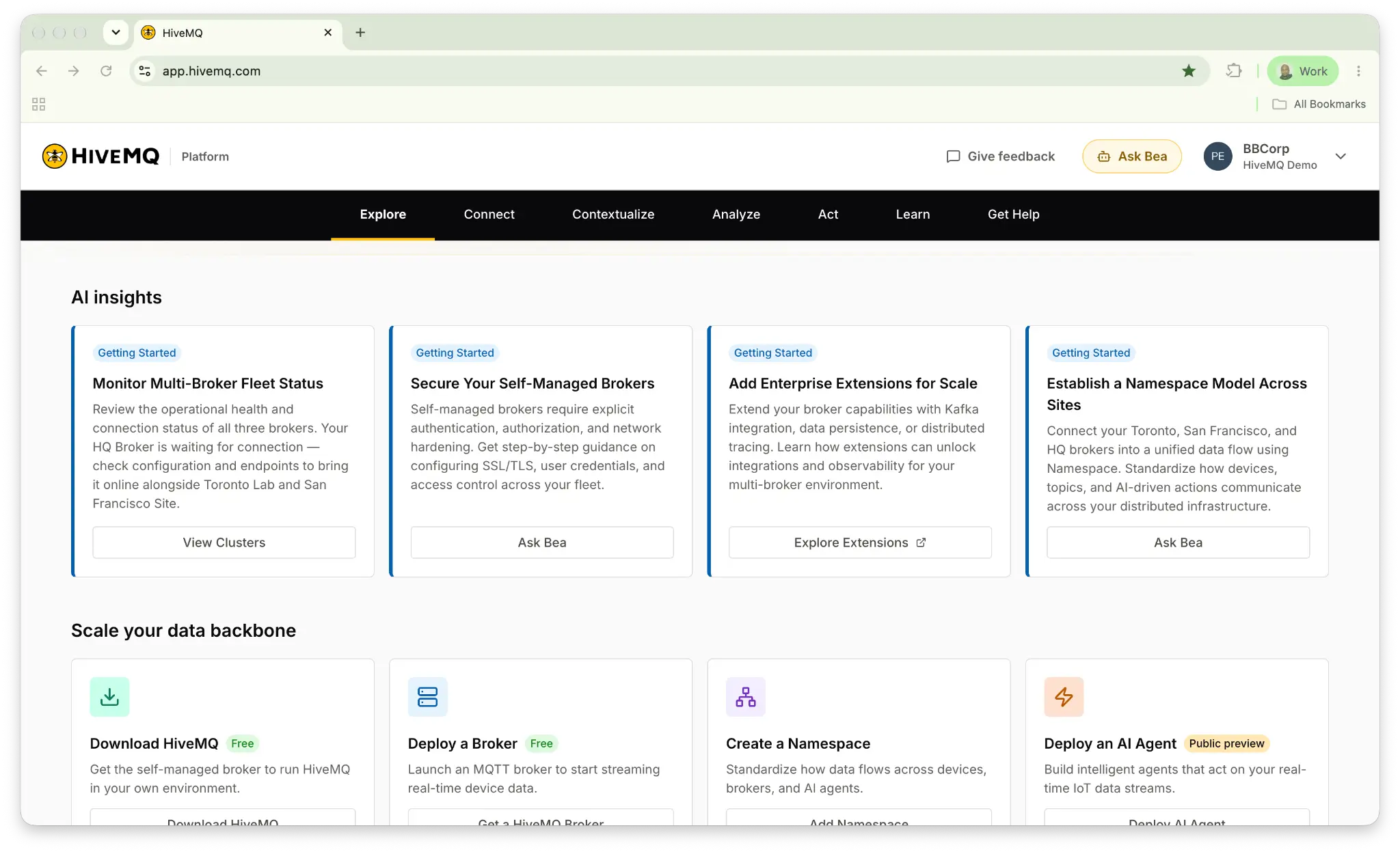
Here I can see AI-generated insights and recommended actions based on the current state of the platform. For example, the platform might recommend connecting a broker, configuring security or setting up monitoring. I also have shortcuts to common tasks, such as deploying a broker, creating a namespace or deploying an AI agent. Across the top, you'll notice the main navigation: Explore, connect, contextualize, analyze, act, learn and get help.
Connect: For connecting industrial data across OT and IT systems
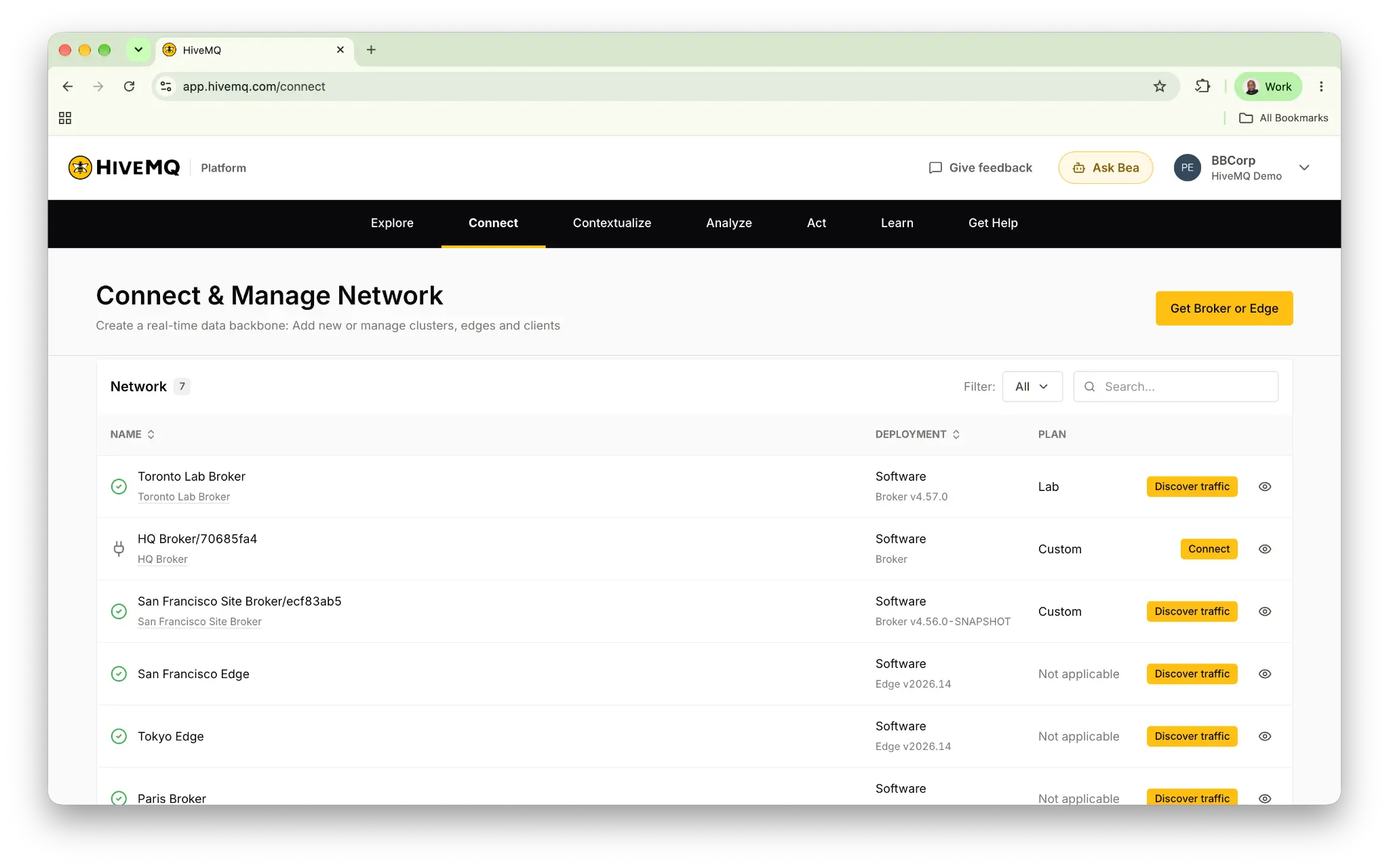
Connect is where I establish and manage the infrastructure that brings operational data into the platform. In the network view here, I can see my HiveMQ brokers and HiveMQ Edge instances along with their deployment and connection status. If I want to bring new infrastructure into the platform,
I have two options. I can connect an existing HiveMQ broker or edge instance that I'm already running or I can deploy something new. For example, I can deploy a self-managed HiveMQ broker using Docker or Kubernetes or choose from the other supported deployment options. I'm going to show you how to deploy and connect it to the HiveMQ platform in the next post in the series. For now, the important thing to understand is that connect establishes my real-time data backbone and makes the MQTT data available to the platform's data intelligence capabilities.
Connect establishes the real-time data backbone that makes operational data available across your industrial environment. For a deeper look at how this connectivity layer works, read our blog Connect: Building a real-time data backbone for data accessibility.
Contextualize: For contextualizing industrial data to inspect MQTT traffic
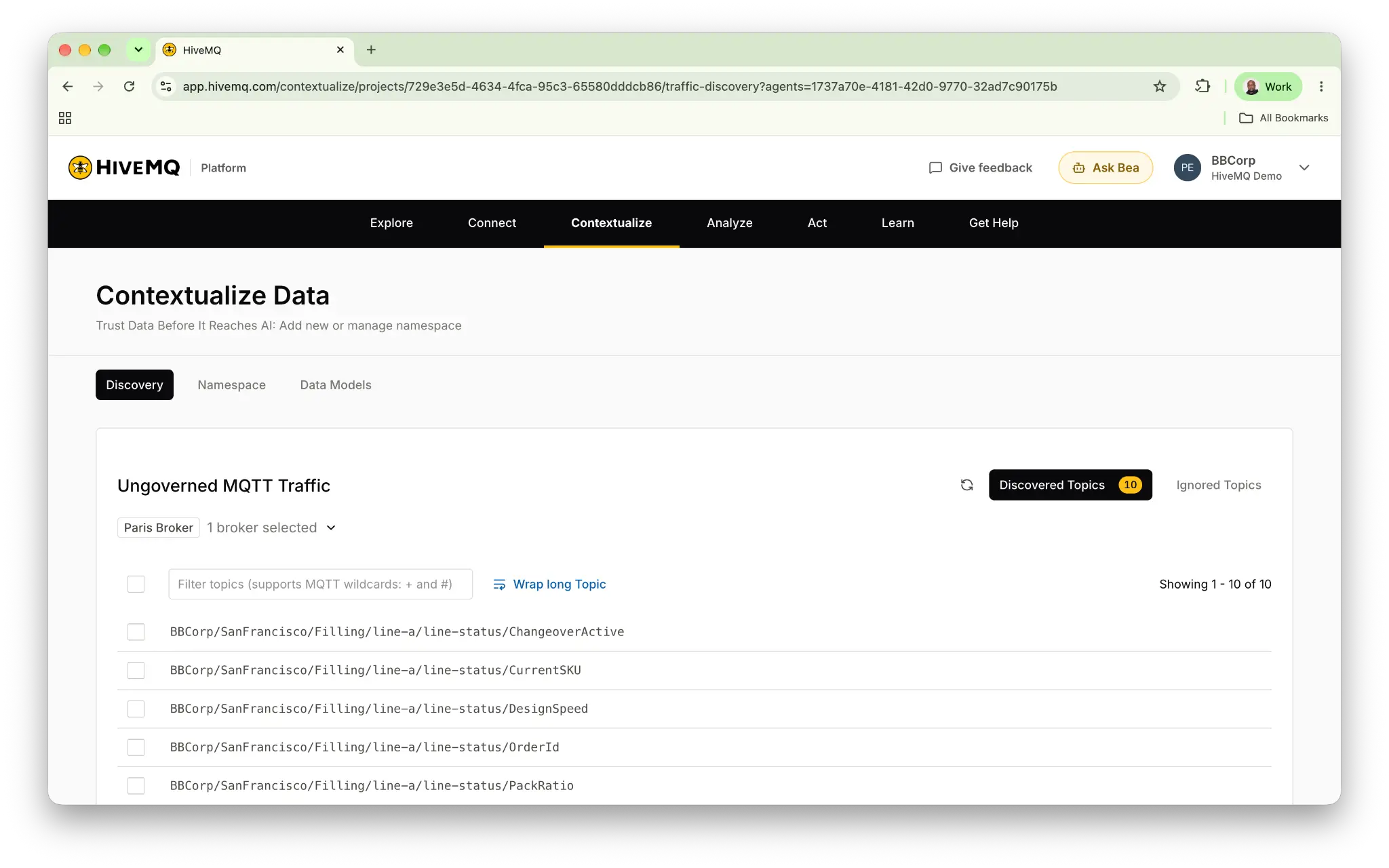
Once I have my operational data flowing through my broker, I need a way to organize it and give it meaning. The first capability here is Discovery.
Discovery allows me to inspect MQTT traffic that is flowing through my connected infrastructure, but hasn't yet been brought under governance. You can see in the screenshot that I currently have ungoverned traffic currently flowing through this broker.
From here, I can bring that data into a governed unified namespace. In this example, I have a manufacturing environment organized into an enterprise, sites, production areas, lines, and individual assets and when I select a tag, I can inspect its properties including its expected data type, where the data comes from and the actual values being published.
But contextualization goes beyond organizing existing MQTT topics. I can also create calculations that derive high level operational information, such as OEE, calculated from availability, performance, and quality and then using data models, I can define reusable data structures for assets, production lines and KPIs so that I don't have to recreate the same model every time.
Essentially, Contextualize helps me turn raw operational signals into structured, governed, and reusable information.
Contextualizing industrial data involves more than organizing MQTT topics; it also means giving operational signals reusable meaning. Read our blog, Contextualize: Turning data into understandable operational information, to learn more about contextual modeling for manufacturing.
Analyze: For analyzing governed MQTT traffic
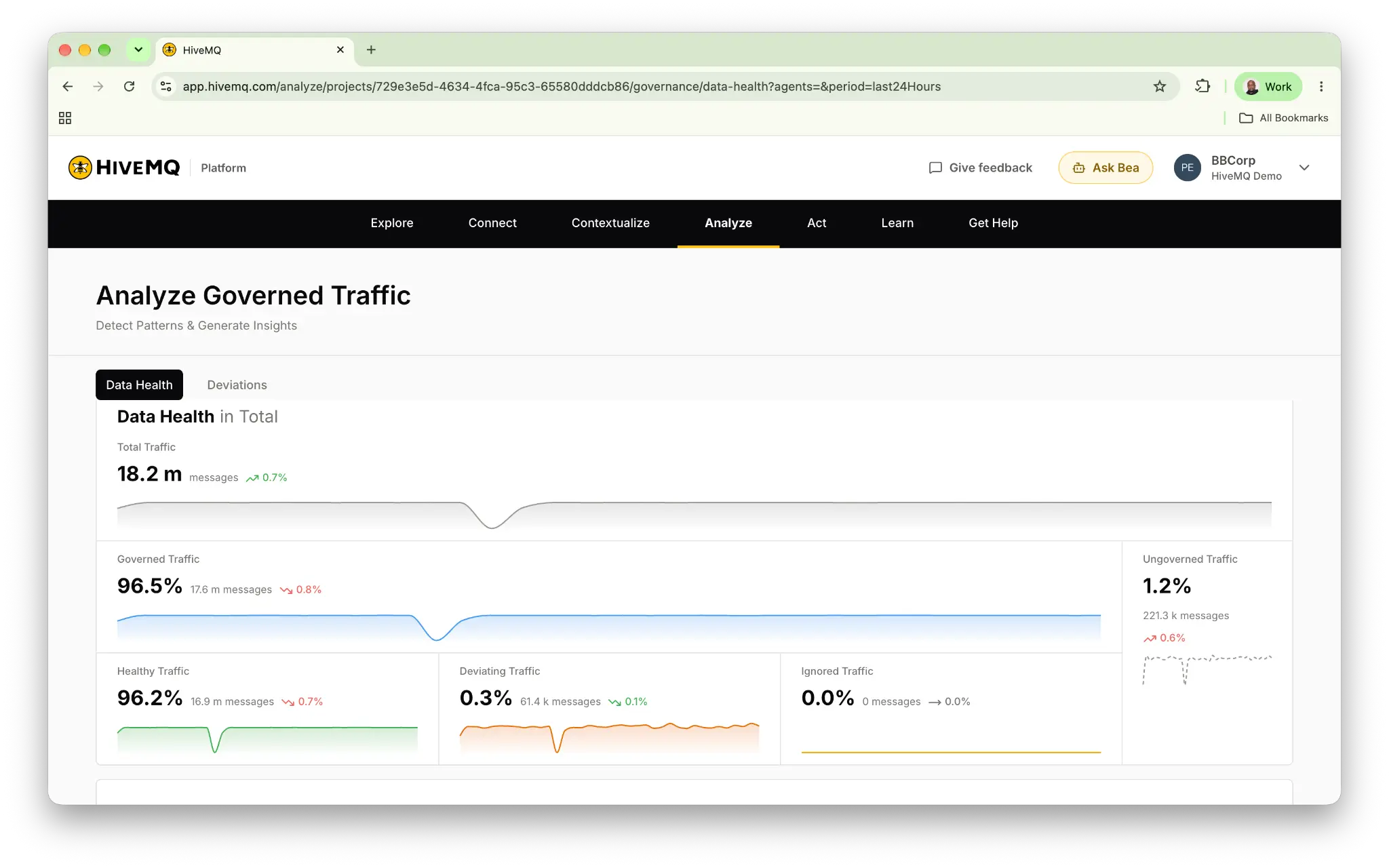
Now that I have established a governed namespace, I need to understand whether my live operational data is behaving as expected. That is what the analyze capability is for. Here I can see the overall health of my MQTT traffic, including how much is governed, how much remains ungoverned, and whether my governed data is healthy or deviating.
For example, let's say I have defined a machine temperature as a numeric value, but the source suddenly starts publishing a string, the MQTT broker might still deliver that message successfully, but it no longer matches my expected data structure. So, Analyze helps me identify those deviations and investigate which assets or namespace nodes are affected. So for example, here we've got an unexpected data format that is being published to the ideal cycle time seconds tag.
Contextualize defines what my data should look like and Analyze helps me determine whether the live data continues to match that definition.
The Analyze capability builds on governed operational data to help teams identify deviations and understand data health in real time. For a deeper look at this stage, read Analyze: Turning contextualized data into actionable real-time intelligence.
Act: For acting on industrial data with governed AI agents
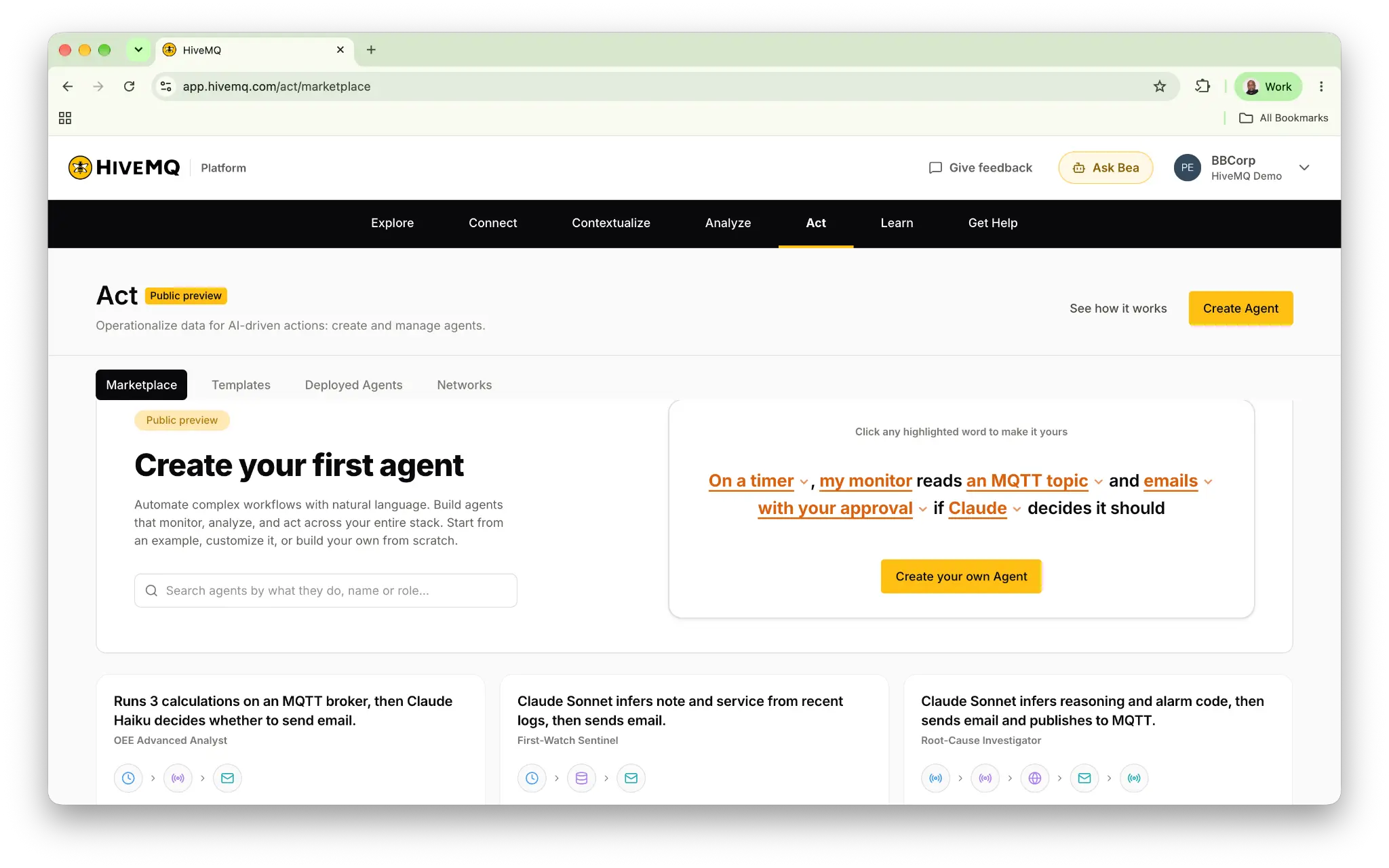
Next is Act. This is where I can use the operational intelligence to build and deploy AI agents that monitor conditions, reason about what's happening, and recommend or execute actions. The first thing I see is the marketplace where I can explore example agents for different operational use cases.
Under templates, I can create and manage my own agent definitions. For example, I might create an agent that monitors production line performance and investigates when performance drops below a defined threshold. When configuring a new agent, I define what triggers it, which data sources it can access, what actions it can take, and how it analyzes that information. So it can either be deterministic rule-based or it could be LLM-based agent reasoning.
Once the agent is deployed, I can monitor its status, health, and execution metrics here and under Networks, I can manage the runtime environments where my agents operate.
The key idea here is that Act builds on the operational data foundation I've established in Connect, Contextualize and Analyze.
Finally, there is Agent Bea, the AI assistant available throughout the platform. I can use Bea to understand platform concepts, troubleshoot issues or get guidance on how to accomplish specific tasks.
For example, I might ask a simple question such as, what is the best way to connect my existing HiveMQ Broker?
How the HiveMQ Platform connects data to governed action
So that's a quick overview of the HiveMQ platform and its main capabilities. The overall journey is straightforward. Connect your data, contextualize it, analyze its health, and act on the resulting intelligence. In the next post in the series, I'll walk you through how to deploy a HiveMQ broker and connect it to the platform so that we can start working with live data.
For a deeper look at how the HiveMQ Platform transforms fragmented machine data into real-time operational intelligence, read From machine data to action: How HiveMQ Platform works. This blog explores the platform's broader architecture and how its capabilities help manufacturers move from connected assets to operational decisions. Do give the platform a try.
Try HiveMQ