The HiveMQ team is excited to announce the release of HiveMQ Enterprise MQTT Platform 4.43.
This release introduces new subscription management options for individual clients in HiveMQ Control Center v2, adds a log file exporter that automatically includes relevant hivemq.log, event.log, and migration.log files to your diagnostic archives, and provides several useful fixes and improvements.
Highlights
- Add and Remove Client Subscriptions in HiveMQ Control Center v2
Enhanced Client Subscription Management Options in HiveMQ Control Center v2
Starting with HiveMQ 4.43, the Control Center v2 interface offers new options to manage standard and shared subscriptions for individual clients. This update continues our effort to improve usability with every release and makes it easy to view, add, and remove client subscriptions directly from the interface.
How it works
Navigate to the HiveMQ Control Center v2 Client Session Overview and select the client for which you want to manage subscriptions. Switch to the Subscriptions tab to view detailed information on the current subscriptions of the client:
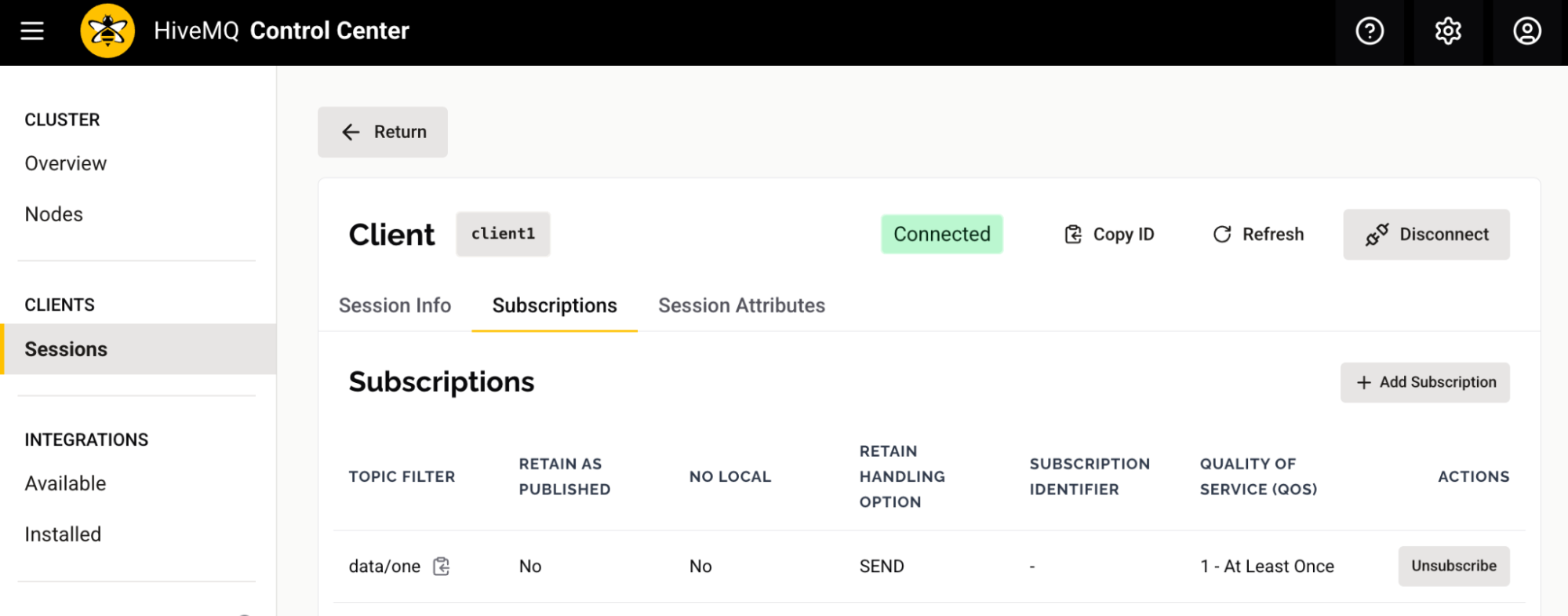
HiveMQ 4.43 adds two new actions to the Subscriptions tab of each client. The Unsubscribe action can be used to remove a subscription from a client. After a confirmation message, the list of active subscriptions for the client automatically updates.
The Add Subscription action appears at the top of the Subscriptions table. Select this action to open a new window where you can add a normal subscription or a shared subscription for the client:
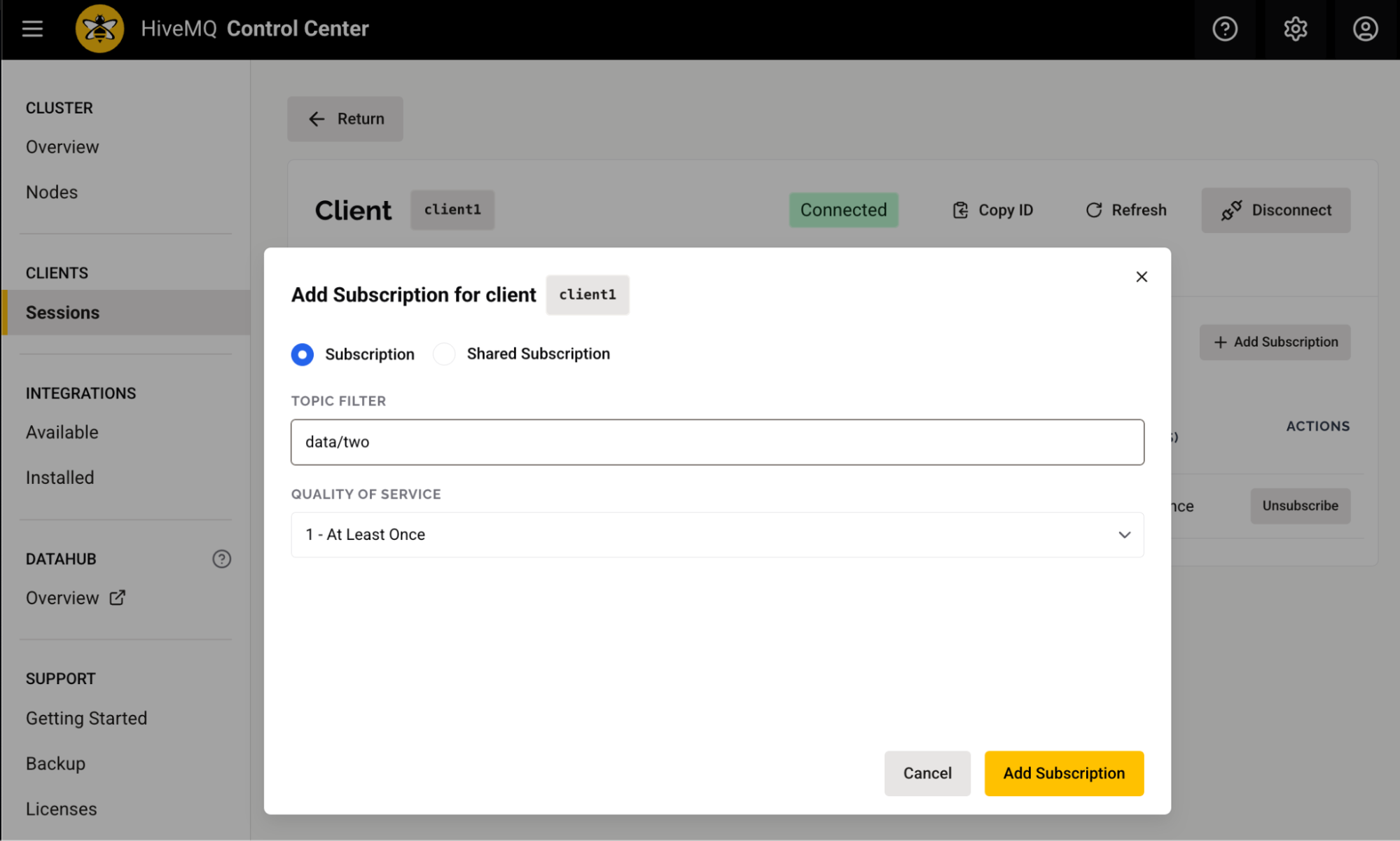
To add a standard subscription for a client, enter a topic filter and select a Quality of Service (QoS) level. To add a shared subscription, the shared subscription name is also required.
How it helps
The ability to manage subscriptions for individual clients directly from your HiveMQ Control Center v2 interface provides greater flexibility and control when quick central interaction is required. The new actions allow administrators to efficiently adjust data flows, remove unwanted subscriptions, and reduce unnecessary traffic.
More Noteworthy Features and Improvements
HiveMQ Enterprise MQTT Broker
- Added a log file exporter that automatically includes relevant
hivemq.log,event.log, andmigration.logfiles in diagnostic archives. - Added support for storing portions of the subscription index on disk to reduce memory usage when matching PUBLISH messages to subscribers.
- Removed a misleading ERROR message that was logged on client disconnects when Data Hub scripting was turned off.
HiveMQ Control Center v2
- Added the ability to manage client subscriptions with unsubscribe and add actions. This requires the new permission
HIVEMQ_EDIT_DATA_SUBSCRIPTION. - Fixed an issue on the Licenses view to ensure the accurate display of active enterprise and custom integration license information.
HiveMQ Data Hub
- Fixed an issue where large unsigned integers were not correctly parsed between Protobuf and JSON.
Get Started Today
To upgrade to HiveMQ 4.43 from a previous HiveMQ version, follow our HiveMQ Upgrade Guide. To learn more about all the features the HiveMQ Platform offers, explore the HiveMQ User Guide.