What’s new in HiveMQ Edge 2025.20
2025.20 brings usability and reliability improvements to HIveMQ Edge. There’s now a creation wizard that will guide users through the creation of key components of the software from the Workspace, enabling users to get up and running faster than ever before, when creating bridge and adapter connections at the edge.
Workspace Creation Wizard: Build Your MQTT Architecture Without Leaving the Canvas
HiveMQ Edge now includes a guided creation wizard that allows users to create entities directly within the workspace. Instead of navigating away from the workspace or using different creation patterns for different entity types. The "Create New" button in Workspace gives users a step-by-step wizard that visually indicates using “ghost-nodes” to show users are creating before committing.
The wizard supports four entity types:
- Adapters: Protocol adapters (HTTP, OPC-UA, Simulation) with ghost preview showing DEVICE → ADAPTER → EDGE BROKER topology
- Bridges: MQTT bridges with ghost preview showing HOST → BRIDGE → EDGE BROKER topology
- Combiners: Data combining nodes with interactive source selection from existing workspace nodes
- Asset Mappers: Asset mapping nodes with required Pulse Agent integration and source selection
- Groups: Groups are visual containers for your entities on the workspace canvas, organising your topology by commonalities
How it works
- Open your workspace and locate the "Create New" button in the workspace toolbar (near the search and filter controls)
- Click "Create New" and select the entity type you want to create from the dropdown menu
- Review the ghost preview showing transparent nodes that represent where your entity will appear
- Click "Next" in the progress bar at the bottom of the screen to begin configuration
- Configure your entity using the familiar forms in the side panel (same forms as standalone creation)
- Click "Complete" to create the entity and see ghost nodes transform into real workspace nodes
All wizard operations complete instantly—ghost nodes render in milliseconds, and the workspace remains responsive throughout the creation process. You can cancel at any step by clicking "Cancel" in the progress bar or pressing the Escape key.
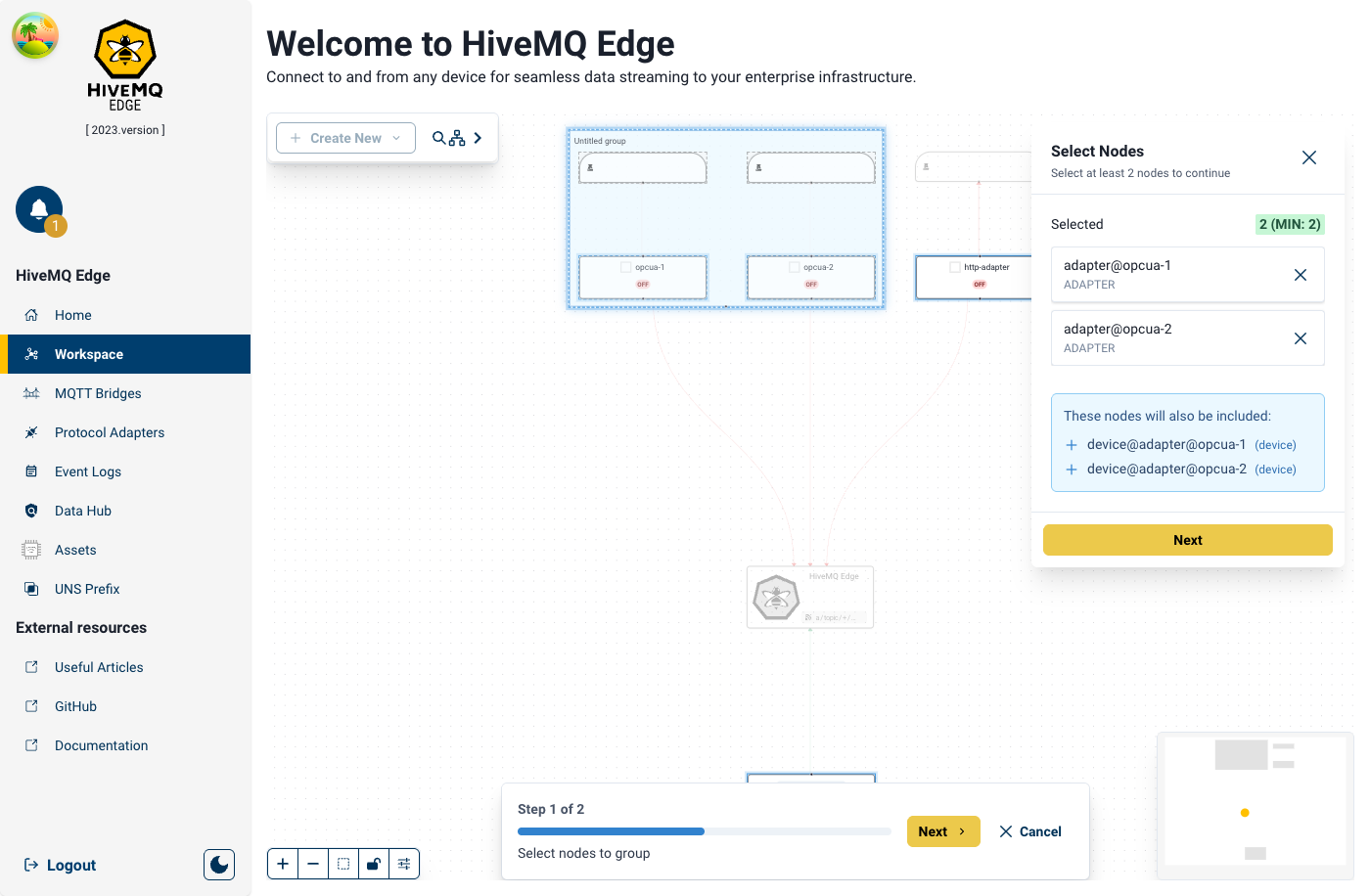
Ghost nodes on workspace canvas showing where an adapter will be created, with progress bar at bottom showing "Step 1 of 3"
How It Helps
The entity creation process has been redesigned for efficiency, unification, and intuition, covering adapters, bridges, combiners, and asset mappers through a consistent flow: preview, selection, configuration, and completion.
Key enhancements include:
- Ghost Preview: An immediate, semi-transparent visual representation of the new entity appears on the workspace topology, allowing users to verify placement before configuration commitment, preventing errors.
- Contextual Side Panel Wizard: Configuration is managed through a side panel, keeping the evolving topology visible for real-time feedback and minimizing cognitive load.
- Direct Source Selection on Canvas: For entities like combiners and asset mappers, users can directly click or drag connections from source nodes onto the new entity, with instant validation in the configuration wizard, making the process faster and more visual.
Improvements
🛠️ Bug Fixes
- OPC UA Protocol Adapter issues
- OPC UA UI issues when configuring encryption options
- Made reconnecting less eager to prevent overwhelming the OPC UA server
- Connections are now more reliable under high load
- ADS Protocol Adapter issues
- When multiple ADS adapters were used and one of those broke, then the others would also stop working
- ADS was always using the default port instead of the configured one
- Timeouts happened for polling interval bigger than 20 seconds
- S7 Protocol Adapter issues
- DATE_AND_TIME data type was not correctly handled
- Timeouts happened for polling interval bigger than 20 seconds
- Fixed an issue where tags with a zero-length array would not be created
- Helm Chart:
- Configured credentials were not used
🚀 Improvements
- S7 now supports the full range of data types as provided by PLC4X
- OPC UA now received a vastly improved error handling for Service Faults
- OPC UA health checks were improved to better reflect the connection status
Deprecation Notice
HiveMQ Edge was migrated to JDK v21 in version 2025.16, HiveMQ Edge will need to be run in the Java run time environment for v21 or higher.
JDK v21 provides many enhancements and improvements to the efficiency and performance of HiveMQ Edge, and enables future data operations capabilities to be brought to the product.
Should you need to run HiveMQ Edge on a 32bit Architecture, or are already running Edge on a 32bit architecture then you should not use any version after 2025.15.
Get Started Today
Use the download link Get HiveMQ Edge 2025.20, or find us on GitHub and Docker:
Get started by running
docker run --name hivemq-edge --pull=always -d -p 1883:1883 -p 8080:8080 hivemq/hivemq-edgeOr clone our repository
git clone git@github.com:hivemq/hivemq-edge.gitYou may also try out our Helm Chart
helm repo add hivemq https://hivemq.github.io/helm-charts && helm repo update